


The most useful technology is often the kind that removes one repeated task from the working day. It does not need to look dramatic. It simply has to make a common process easier to organize.
WhatsApp Web is a good example. Many small teams already use it for daily communication with customers, students, prospects, attendees, or booking clients. The problem is not that WhatsApp Web is hard to use. The problem is that sending the same type of message to many people can become slow, repetitive, and difficult to review.
A browser-based sending tool helps close that gap.
The Hidden Cost of Manual Messaging
Manual WhatsApp sending works well when the list is short. Open a chat, write the message, attach a file, send it, and move on. But once the list grows, the workflow starts to feel less reliable.
Numbers need country codes. Names need to be changed. Attachments need to match the message. Failed sends need attention. If the same campaign has to be repeated later, the sender may have to rebuild the process from old notes, spreadsheets, and chat history.
These are not major technical failures. They are small workflow frictions. For a business that sends order confirmations, appointment reminders, class alerts, event updates, or sales follow-ups, those frictions can take up a surprising amount of time.
A No-API Workflow for WhatsApp Web
Not every team wants to set up a complex WhatsApp Business API workflow. Some simply need a practical way to send messages from the browser they already use.
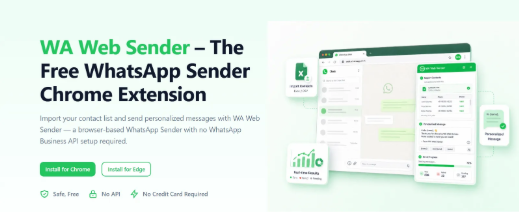
A browser-based WhatsApp Sender can support this kind of everyday workflow. WAWebSender lets users send bulk WhatsApp messages directly from WhatsApp Web without requiring an API or technical setup. Contacts can be imported from Excel or CSV files, or numbers can be pasted manually with country codes.
This makes the tool easier to adopt for individuals and small teams that need structure, but do not want a heavy system just to send routine updates.
Personalization Makes Bulk Messages More Useful
Bulk messaging should not mean sending vague text to everyone. The better approach is to prepare one campaign and make each message specific with contact fields.
For example, an appointment reminder can include the person’s name, date, and time. An e-commerce update can include an order reference. An education message can include a class name or schedule detail. A B2B sales message can include a company name or relevant note from the contact list.
Personalization helps the recipient understand why the message matters. It also reduces avoidable replies, because the message already includes the details people usually ask for.
Templates Turn Repeated Campaigns Into a Process
Many WhatsApp messages follow the same structure again and again. A business may send shipping updates every week. A training provider may send class reminders before each session. An event organizer may reuse invitation and reminder formats.
Message templates make these repeated campaigns easier to manage. Users can create, save, and reuse prepared messages instead of rewriting the same content from scratch.
This is especially helpful when communication is handled by more than one person. A template gives the team a consistent starting point while still allowing details to be adjusted for each send.
Attachments Keep the Message Complete
Real WhatsApp communication often includes files. A seller may share a product image or catalog. A school may send a document. An event team may send a poster. A service provider may include a PDF or short video.
WA Bulk Message Sender, the official Chrome extension from WA Web Sender, supports adding supported images, videos, and documents to a sending task. Users can also import Excel or CSV contact lists, personalize messages with imported fields, configure sending intervals, and monitor task progress inside WhatsApp Web.
Users who prefer working in Chrome can Install Free WhatsApp Sender and use it with WhatsApp Web for a browser-based sending workflow.
Sending Intervals Add Control
Speed is not the only goal. A good sending workflow should also be controllable.
Sending intervals allow users to set the time gap between messages. This can make a task easier to monitor and can help reduce the risk of being flagged. It also gives the sender time to notice problems, such as an outdated file, a wrong message detail, or a contact list that needs correction.
A controlled pace is a practical habit. Bulk messaging should feel organized, not rushed.
Progress Tracking Makes Follow-Up Easier
Manual sending often leaves the sender with limited visibility. It may not be clear which messages were completed, which failed, or which contacts need another attempt.
WAWebSender can track sending progress in real time, show completed and failed deliveries at a glance, export sending results for campaign review, and retry failed messages with a single click. The extension also supports pausing or resuming active tasks.
This turns WhatsApp sending into a process that can be checked and improved, rather than a one-time copy-paste effort.
Practical Technology Does Not Have to Be Complicated
A modern tech stack is not only made of large platforms. It also includes small tools that make daily work cleaner.
For teams that already rely on WhatsApp or WhatsApp Business, a browser-based sender can make routine outreach easier to manage. It helps organize contacts, messages, templates, attachments, pacing, progress, and follow-up in one practical workflow.
The value is simple: less manual repetition, fewer avoidable mistakes, and a clearer way to handle the messages that keep everyday operations moving.

