


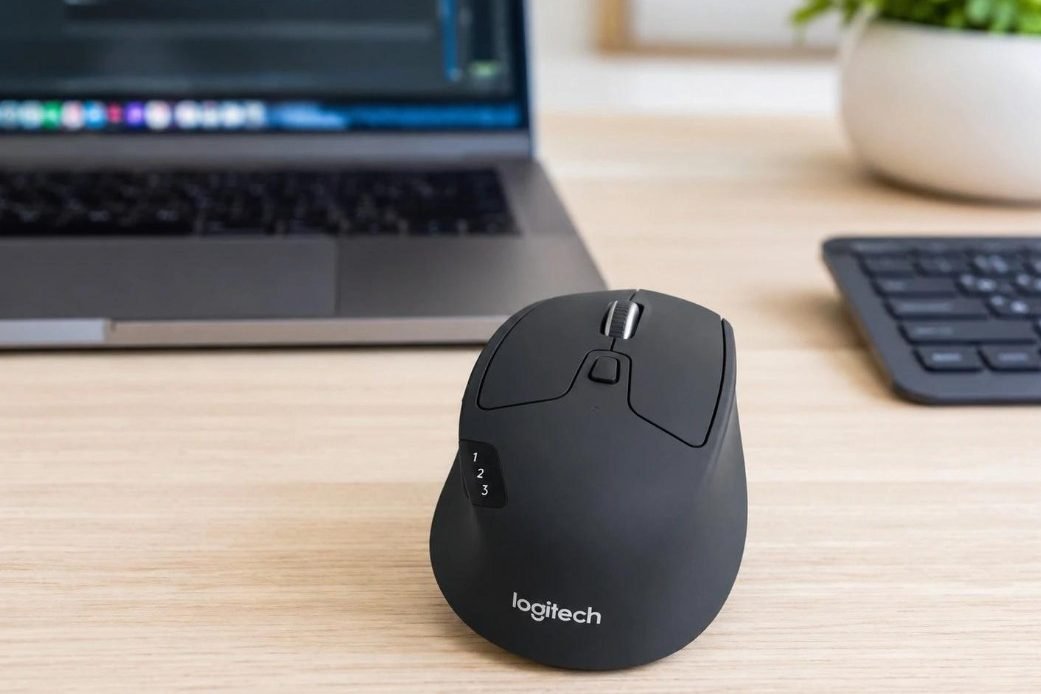
The Logitech M720 Triathlon is not a flashy mouse, and that is part of its charm. It does not try to look like a gaming mouse. It does not rely on RGB lights or bold design tricks. Instead, it focuses on comfort, long battery life, strong wireless support, and easy switching between devices.
That makes it a very good fit for work desks, home offices, students, and people who move between a laptop, desktop, and tablet during the day.
For a closer look at the design, comfort, and daily use, read this full Logitech M720 Triathlon review.
What Is the Logitech M720 Triathlon?
The Logitech M720 Triathlon is a right-handed wireless mouse made for people who use more than one device. It connects through Bluetooth Low Energy or the Logitech Unifying USB receiver. So, it fits many desk setups without much fuss.
You can pair it with up to three devices. Then, you press the Easy-Switch button to move from one device to the next. That is useful if you use a work laptop, a personal desktop, and a tablet in the same room.
It runs on one AA battery. Logitech rates the battery life at up to 24 months, which is one of the main reasons people still buy this mouse. You do not need to think about charging cables every week.
Main Specs
- Connection: Bluetooth Low Energy and Logitech Unifying 2.4 GHz receiver
- Wireless range: up to 10 m
- Battery: 1 AA battery
- Battery life: up to 24 months
- Sensor: optical tracking
- DPI: 1000
- Buttons: 8
- Device switching: up to 3 paired devices
- Scroll wheel: precise scrolling, fast scrolling, tilt wheel, middle click
- Size: 115 x 74 x 45 mm
- Weight: 135 g with battery
- Shape: right-handed, full-size, contoured body
Why the M720 Still Feels Useful
The M720 has been around for a while, but it still feels relevant. The reason is simple. Many people no longer work on just one computer.
A normal day might start on a laptop, then move to a desktop monitor, then end with a tablet on the couch. The M720 handles that setup better than a basic mouse.
The three-device switching is the main feature here. Once paired, the mouse can jump between devices with one button. It feels small at first, but after a few days, it becomes one of those features you miss on cheaper mice.
The design helps too. The mouse has a larger body, so it supports your hand better than a tiny travel mouse. The rubber grip on the side gives it a secure feel. It is not fancy, but it feels made for long work sessions.
Comfort and Daily Use
The Logitech M720 Triathlon works best for medium and large hands. It has a rounded shape and enough height to support the palm. The grip feels natural if you use a palm grip or relaxed claw grip.
The mouse has some weight to it. That comes partly from the AA battery. Some people will like that solid feel. Others may prefer a lighter mouse. For office work, the weight feels fine. For fast gaming, it feels too slow and too heavy.
The buttons feel firm. They are not silent, so this is not the best choice for a very quiet bedroom or shared space at night. Still, the clicks feel normal for a work mouse.
The right-handed shape is another point to know before buying. Left-handed users should skip this model.
The Scroll Wheel Is a Big Strength
The scroll wheel is one of the best parts of the M720. You can use it in precise mode for small movements. Then, you can switch to fast scrolling for long web pages, PDFs, and spreadsheets.
This sounds like a small feature, but it makes a real difference during work. Long product pages, reports, and Google Sheets files become easier to handle.
The wheel also tilts left and right. That helps with wide spreadsheets or timelines. Many users will not need it every day, but it is useful when a page stretches wider than the screen.
Buttons and Custom Controls
The M720 has 8 buttons. You get the normal left and right buttons, the scroll wheel, side buttons, a hidden thumb button, and the Easy-Switch control.
The side buttons work well for back and forward actions in a browser. The thumb button can handle gestures or custom commands through Logi Options+ on Windows and macOS.
This is where the mouse becomes more useful than a basic wireless model. You can set different actions for different apps. For example, one button can work for copy, paste, app switching, or desktop control.
The mouse still works without extra software. Still, the custom buttons become more useful once you set them up.
Common Issues to Know
The M720 is a good work mouse, but it has a few weak spots.
The 1000 DPI sensor works fine for normal office use. Yet it can feel slow on a large 4K monitor or a multi-monitor setup. Users who like fast cursor movement may prefer a mouse with higher DPI settings.
The click sound can bother people who need a quiet mouse. It is not extremely loud, but it is not quiet either.
The scroll wheel may feel too loose in fast mode for some users. Others will love it. This part comes down to taste.
The shape only suits right-handed users. That limits who should buy it.
Best Uses for the Logitech M720 Triathlon
The M720 works best for:
- Home office work
- Web browsing
- Spreadsheets
- Online research
- Light photo editing
- Laptop and desktop setups
- Tablet and computer switching
- Long work sessions
- People who dislike charging cables
It is not the right mouse for competitive gaming, left-handed use, or small travel bags.
Logitech M720 Triathlon vs a Basic Wireless Mouse
A basic wireless mouse can click, scroll, and move the cursor. For some users, that is enough.
The M720 offers more. It gives you device switching, better scroll control, extra buttons, and long battery life. These features matter if you spend many hours at a desk.
For one laptop, a cheap mouse can do the job. For two or three devices, the M720 feels much more practical. It keeps your desk cleaner and saves you from pairing or unplugging devices all the time.
Logitech M720 Triathlon vs Logitech MX Master
The MX Master series feels more premium. It has a more advanced sensor, a larger shape, more controls, and a rechargeable battery. It costs more too.
The M720 is the better value choice for many office users. It covers the most useful features at a lower price. It also uses a replaceable AA battery, which some people prefer.
Choose the M720 if you want strong daily value, long battery life, and simple multi-device support. Choose the MX Master if you want a more premium feel and more advanced controls.
Is the Logitech M720 Triathlon Good for Work From Home?
Yes, the M720 is a strong choice for work from home. It is comfortable, easy to set up, and useful across several devices. The battery life is excellent, and the fast scroll wheel helps with long pages and documents.
The mouse fits well in a desk setup with a laptop stand, external monitor, keyboard, and tablet. It does not take much space, but it gives you more control than most basic wireless mice.
Who Should Buy It?
Buy the Logitech M720 Triathlon if you want:
- A comfortable right-handed mouse
- Bluetooth and USB receiver support
- Up to 3 device connections
- Long battery life
- Fast scrolling
- Extra buttons
- Strong value for office work
Skip it if you want:
- A gaming mouse
- A silent mouse
- A left-handed mouse
- A very small travel mouse
- A high-DPI mouse for a large monitor setup
Final Verdict
The Logitech M720 Triathlon remains a smart pick for office users, students, remote workers, and anyone who uses more than one device. It feels practical rather than premium, but that is exactly why many people like it.
The comfort is good. The battery life is excellent. The scroll wheel is useful every day. The device switching works well after setup.
It has limits, of course. The 1000 DPI sensor is basic, the clicks are not silent, and the shape only works for right-handed users. Still, for normal work, browsing, spreadsheets, and home office use, the M720 gives you a lot for the money.

