


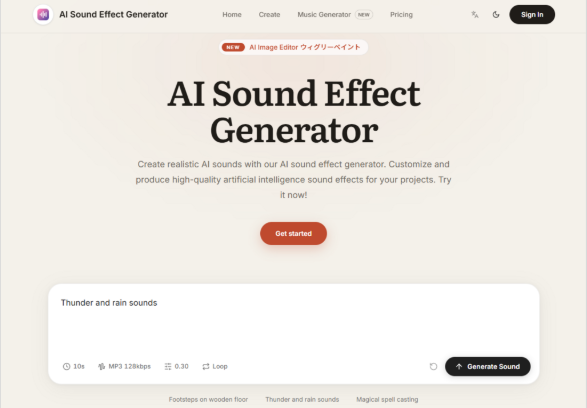
There is a moment in every creative project when you know exactly what you want to hear but cannot find it anywhere. You have the scene in your mind, the mood mapped out, the emotional beat timed perfectly—and then you spend forty-five minutes scrolling through library after library, listening to variations that are close but not quite right. AI Sound Effect Generator addresses that specific moment not by offering a bigger library, but by changing the fundamental relationship between you and the sound you need.
The Technology Behind the Generation
Understanding how the platform works helps clarify what it can and cannot do. The technology relies on deep learning models and neural networks to analyse and synthesise audio data. It learns from existing sound samples and then generates new sound effects based on the learned patterns. The AI technology can adapt to different input parameters and produce realistic and diverse sound effects.
What Learning from Samples Actually Means
The AI is not simply retrieving pre-recorded files from a database. It is constructing sounds from the ground up, based on its understanding of how those sounds are structured. This is why it can produce variations that do not exist in any library—and why it can mimic natural sounds with a high level of accuracy, replicating the complex patterns and nuances of animal calls, environmental noises, and atmospheric effects.
How the Platform Interprets Your Input
The interface centres on three elements: a prompt field, a duration selector, and a generate button. The prompt field is your primary creative control. The examples on the platform demonstrate the range: a dog barking behind a fence, the sound of a thunderstorm, fireworks exploding during a show, typing on a keyboard. Each of these prompts describes not just a sound but a context—a spatial arrangement, an environment, a set of conditions.
The Generation Process in Practice
From a practical user perspective, the generation process involves a few straightforward steps.
Step One: Describe What You Want to Hear
You type your prompt into the Prompt field. The more specific you are, the more targeted the result. In my testing, prompts that included environmental details—”rain on a tin roof” rather than just “rain”—produced noticeably more nuanced outputs.
The Relationship Between Prompt Specificity and Output Quality
The AI parses not just the objects in your prompt but also the spatial and environmental cues embedded in your phrasing. This means you can describe the acoustic character of a space: echo, distance, reverb, proximity. The platform’s examples illustrate this principle. “A dog barking behind a fence” implies distance and obstruction. “Fireworks exploding during a show” implies an outdoor environment with crowd presence. The AI appears to interpret these contextual details.
Step Two: Set the Duration
You specify the total length of the sound you expect to generate in the Second Total field. This is a practical consideration that affects how the AI structures the output. A two-second sound and a ten-second sound require different temporal organisation. The platform supports long duration sound effects, which means you are not limited to short clips.
Step Three: Generate and Evaluate
Clicking Run submits your request and consumes one credit. The generation speed is fast enough to support an iterative workflow. You can generate a version, listen critically, adjust your prompt based on what you hear, and generate again.
The Iterative Process
This is where the platform reveals its practical value. Each generation is a conversation with the AI. You describe, it responds, you adjust, it refines. The ability to generate multiple variations of the same prompt without significant time penalty means you can explore different interpretations of your creative brief. This iterative process often produces results that are more interesting than a single, static generation.
What the Output Actually Sounds Like
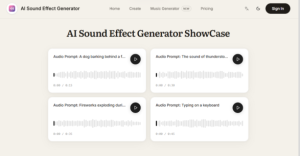
The platform promises high-quality audio output, with each sound effect meticulously crafted to deliver exceptional clarity and depth. In practice, this translates to audio that is clean, detailed, and free from the compression artefacts that sometimes plague AI-generated content.
Realism and Natural Sounds
The AI can mimic natural sounds with a high level of accuracy. Through advanced algorithms and machine learning, it can analyse and replicate the complex patterns and nuances of natural sounds, such as animal calls, environmental noises, and atmospheric effects, providing realistic and lifelike audio experiences. In my testing, environmental sounds like rain, wind, and thunder were particularly convincing. The AI appears to have a strong grasp of the temporal and spectral characteristics of natural acoustics.
Synthetic and Designed Sounds
The platform handles non-realistic sounds as competently as environmental ones. Prompts for UI sounds, digital tones, and abstract effects produced clean, usable results. The AI does not appear to bias toward natural sounds; it treats all prompts equally, which makes it useful for a wide range of applications.
Professional Applications and Workflow Integration
The platform is suitable for professional audio production. It can assist sound designers, composers, and audio engineers in creating high-quality sound effects for films, video games, virtual reality experiences, and other media projects. The advanced capabilities of AI technology can enhance the creative process and expand the possibilities of audio design.
Film and Video Production
For filmmakers and video producers, the platform offers a way to generate custom sound effects without the overhead of location recording or library searching. The ability to generate ambient beds, Foley replacements, and transitional sounds on demand streamlines the post-production workflow.
Game Development
For game developers, the platform provides a source of environmental sounds, UI feedback, and atmospheric layers. The commercial use rights included in all plans mean you are not navigating complex licensing agreements for each asset.
Music Production and Multimedia
For musicians and multimedia artists, the platform offers a way to generate unique audio elements that can be sampled, processed, and integrated into larger compositions. The wide range of options available suits diverse needs, from background music to ambient noise to special effects.
Realistic Limitations and Considerations
No tool is perfect, and the platform has limitations that are worth acknowledging.
Prompt quality is the primary variable. The output quality depends heavily on the clarity and specificity of your prompt. Vague descriptions produce vague results. The platform works best when you invest time in crafting precise, sensory language.
Consistency varies across generations. Generating the same prompt twice may produce different results. This can be a feature for exploration but a challenge for projects that require strict sonic continuity.
Complex scenes may require layering. Packing too many elements into a single prompt can produce a muddied result. Breaking a complex scene into separate generations and layering them in a DAW often yields better control.
The output is professional-grade but not always mix-ready. The audio is clean and detailed, but some generations may benefit from light EQ or compression to sit perfectly in a dense mix. The platform delivers a powerful starting point, not a finished master.
Who This Tool Serves Best
The platform fits specific creator profiles particularly well.
Creators who need custom sounds quickly. Podcasters, video producers, and content creators who need audio on a regular basis will appreciate the speed and simplicity of the generation workflow.
Indie developers with limited budgets. Game developers and independent filmmakers who cannot afford extensive sound libraries or dedicated sound designers can generate professional-quality audio without the overhead.
Sound designers seeking inspiration. The platform can function as a brainstorming partner, generating rough sketches that can be refined further in a DAW.
Projects that require unique audio. When you need a sound that does not exist in any library, the platform offers a way to create it from scratch.
The Shift in Creative Possibility
What strikes me most about this approach is how it changes the creative process. Traditional sound design starts with a search: you look for something that already exists, then adapt it to your needs. The platform flips that model. You start with your intention, describe it, and the AI builds something new.
That shift matters because it expands what is possible. When you search, you are constrained by what others have recorded. When you generate, you are constrained only by your ability to describe what you hear. For anyone who has ever felt limited by the contents of their sound library, that is a meaningful expansion of creative possibility.
AI Sound Generator does not claim to replace the artistry of sound design. It positions itself as a tool that saves time, reduces costs, and helps projects move forward. In my experience, it delivers on that promise. The results are not always perfect on the first try, but they are consistently useful—and sometimes, they are surprising in ways that lead to better creative decisions than I would have made on my own.

