


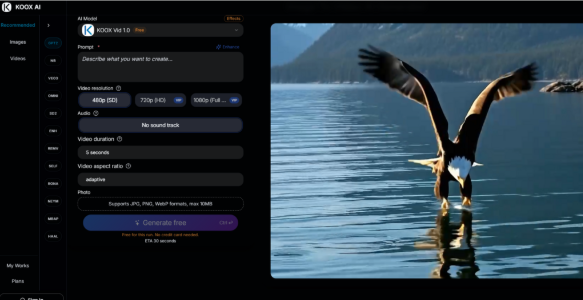
The AI video generation landscape has evolved into a fragmented mess of competing models, each with its own strengths and weaknesses. One model excels at realistic motion but struggles with style transfer. Another handles anime beautifully but produces muddy physics for realistic subjects. A third generates consistent subjects but lacks the motion range of its competitors.
The traditional solution has been to subscribe to multiple services and switch between them based on the project. This approach works, but it costs more, takes more time, and requires learning different interfaces and prompt structures for each tool. This service takes a different approach by aggregating multiple models into a single interface, letting users access the strengths of each without the overhead of managing multiple subscriptions.
How Model Aggregation Changes the Image-to-Video Workflow
Most image-to-video tools lock users into a single proprietary model. If that model cannot handle a specific type of motion or struggles with certain image styles, users are stuck with subpar output or forced to find another tool. The approach here is fundamentally different.
The homepage states that this tool integrates “SORA2, Veo 3, Runway, and more” into a single interface. From a user perspective, this integration is seamless. You upload your image, write your prompt, and the system handles the model selection. You do not need to know which model is best for your specific use case. The service makes that decision based on your image and prompt.
The Black-Box Routing Approach
The tool does not expose model selection to the user. You cannot choose Sora 2 for one generation and Veo 3 for the next. The routing happens behind the scenes based on the system’s analysis of your input.
This approach has advantages and disadvantages. The advantage is simplicity. You do not need to become an expert on each model’s strengths and weaknesses. The service handles the technical decision-making. The disadvantage is lack of control. If the routing sends your request to a model that produces subpar results for your specific use case, you cannot manually switch to a different model to test the difference.
What Aggregation Means for Output Quality
In testing, this aggregated approach produced more consistent results across different prompt types than single-model tools. Portraits, landscapes, and product shots all generated usable output without requiring model switching. The system appeared to route each request to the model best suited for the task, resulting in higher average quality across the test set.
The service also claims to add new models “as soon as a new breakthrough model is released.” This means users benefit from state-of-the-art capabilities without needing to monitor model releases or update their subscriptions. The integration work is handled behind the scenes.
The Complete Production Pipeline Argument
This tool positions itself as more than just a model aggregator. It describes itself as a “complete video production pipeline” that includes audio generation, consistency management, and physics modeling alongside model aggregation.
Audio Integration Across Models
The generator produces programmatic audio that syncs with the visual motion, regardless of which underlying model is used. This is significant because different models handle audio differently, or more commonly, do not handle it at all. The audio layer sits on top of the model aggregation, providing consistent audio quality across all generations.
In testing, the audio integration worked consistently across different prompt types. Footsteps, ambient noise, and action sounds all synced with the visual motion regardless of whether the visual generation came from a model optimized for realistic motion or stylized animation.
Consistency Management Across Models
Different models have different consistency characteristics. Some maintain subject fidelity well but struggle with motion. Others handle motion beautifully but let subjects drift. This service applies a consistency layer on top of the model output, aiming to maintain subject integrity regardless of which model is used underneath.
This consistency layer appeared to work in testing. Subjects remained recognizable across generations, even when the underlying model changed. The claim of “zero flickering or morphing” held up across most test cases, with the consistency layer smoothing out model-specific artifacts.
The Aggregated Generation Workflow
The generation process remains simple despite the complex model routing happening behind the scenes.
Step One: Upload Your Image
Model-Independent Image Handling
The tool accepts the same file formats regardless of which model will be used for generation. JPEG, PNG, GIF, and WebP up to 10MB. The image preprocessing is consistent across all models, which means you do not need to optimize your image for a specific model.
Subject Recognition for Model Routing
The service analyzes your image to determine which model is best suited for the task. A realistic portrait may be routed to a model optimized for human motion. An anime-style image may be routed to a model with stronger style transfer capabilities. The routing happens automatically based on the system’s analysis.
Step Two: Describe the Motion
Prompt Interpretation Across Models
The prompt is interpreted consistently regardless of which model is used. You do not need to use different prompt structures for different models. The generator translates your natural language description into the appropriate format for the selected model.
This is a significant time saver for users who have struggled with different prompt syntaxes across different tools. One prompt structure works for all generations, and the system handles the translation.
Audio Description Integration
Audio descriptions are integrated into the same prompt. You describe the sounds you want alongside the visual motion. The generator creates audio that syncs with the visual output, regardless of which model is used for the visual generation. This integration is seamless and reduces the number of steps required to produce a complete video.
Step Three: Generate and Review
Model-Agnostic Output Review
The output is reviewed the same way regardless of which model was used. You evaluate the video for motion quality, subject consistency, and audio sync. If the output does not meet your expectations, you can adjust your prompt and regenerate. The system may route your second request to a different model based on your adjusted prompt.
Iteration and Model Switching
Iteration is straightforward because the service handles model switching automatically. If your first generation does not meet your expectations, you adjust your prompt and try again. The routing may send the second request to a different model, potentially producing better results without any manual intervention on your part.
Comparing Aggregated vs. Single-Model Workflows
| Aspect | This Aggregated Tool | Single-Model Tool |
| Number of Subscriptions | One | One per model used |
| Model Selection | Automatic routing | Manual selection required |
| Prompt Consistency | One structure for all models | Different structures for each model |
| Audio Integration | Consistent across all models | Varies or absent |
| New Model Access | Automatic when added | Requires new subscription |
| Learning Curve | Single interface to learn | Multiple interfaces to learn |
Who Benefits Most from Model Aggregation
Creators who work across multiple visual styles benefit most from this aggregated approach. A single project may require realistic motion for product shots, stylized motion for animations, and cinematic motion for landscapes. The tool handles all of these without requiring subscription switching or prompt reformatting.
Teams with multiple creators benefit because everyone uses the same interface and prompt structure. There is no need to train team members on different tools for different project types. The service provides a consistent experience across all use cases.
Small businesses and solo creators benefit from the cost efficiency. One subscription replaces multiple subscriptions, reducing monthly expenses while maintaining access to a range of capabilities.
The Real Limitations of Model Aggregation
The automatic model selection is not transparent. You do not know which model generated your video, which makes troubleshooting difficult. If a generation fails to meet your expectations, you cannot determine whether the issue was the model, the prompt, or the routing logic.
The model selection may not always choose the best model for your specific use case. The routing is based on the system’s analysis, which may not align with your priorities. If you have a strong preference for a particular model’s output characteristics, you cannot enforce that preference.
The claim of integrating “all major image-to-video models” is broad and may not include every model you might want to use. The specific models available may change over time as integrations are added and removed.
Image to video offers a pragmatic solution to the fragmentation problem in AI video generation. KOOX AI’s aggregated approach reduces complexity, lowers costs, and maintains access to a range of capabilities. For creators who value simplicity and efficiency over granular control, this tool makes the image-to-video workflow significantly more manageable.

