


Spotify has become one of the most popular platforms for discovering and streaming music, offering millions of songs, albums, playlists, and podcasts. However, Spotify’s offline listening feature comes with limitations: downloaded songs are only available inside the Spotify app and cannot be transferred to MP3 players, USB drives, or other devices.
If you want to download Spotify music to MP3 files for flexible offline playback, you need a dedicated Spotify music converter. In this guide, we will explain different ways to download Spotify songs to MP3 and introduce ViWizard Spotify Music Converter, a professional tool designed to save Spotify music as MP3 with high quality.
Can You Download Spotify Music Directly as MP3?
Spotify Premium users can download songs for offline listening, but these downloads are encrypted and stored within the Spotify app. They cannot be exported as MP3 files or played with other media players.
This means that even if you have a Premium subscription, you cannot directly transfer your Spotify downloads to devices such as:
- MP3 players
- USB flash drives
- Car audio systems
- Smart speakers
- Video editing software
To get actual MP3 files from Spotify, you need a tool that can convert Spotify songs into common audio formats while keeping the original audio quality and metadata.
Why Download Spotify Music to MP3?
Saving Spotify songs as MP3 files offers several advantages:
- Listen to Spotify Music Anywhere
MP3 is one of the most widely supported audio formats. Once your Spotify songs are converted to MP3, you can play them on almost any device without installing the Spotify app.
- Enjoy Offline Music Without Spotify Restrictions
Downloading Spotify music to MP3 allows you to listen without an internet connection, making it convenient when traveling, commuting, or in areas with poor network coverage.
- Create Your Own Music Library
By converting your favorite Spotify playlists, albums, or tracks to MP3, you can build a personal music collection and organize your songs based on your preferences.
- Use Spotify Songs for Personal Projects
MP3 files are easier to import into music players, editing programs, or personal creative projects compared with Spotify’s protected offline files.
Method 1: Download Spotify Music to MP3 with ViWizard Spotify Music Converter
For users who want a simple and reliable way to convert Spotify songs to MP3, ViWizard Spotify Music Converter provides an easy solution. It can download and convert Spotify songs, albums, artists, playlists, and podcasts into MP3 and other popular formats, including FLAC, WAV, AIFF, M4A, and M4B.
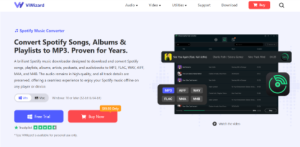
Unlike traditional audio recording methods, ViWizard uses advanced conversion technology to preserve audio quality and important metadata information such as song titles, artists, albums, and track numbers.
Key Features of ViWizard Spotify Music Converter
- Convert Spotify music to MP3, FLAC, WAV, AIFF, M4A, and M4B
- Download Spotify songs, playlists, albums, and podcasts
- Keep original audio quality and ID3 tags
- Support batch conversion for multiple songs
- Customize output format, bitrate, and sample rate
- Work with both Windows and Mac computers
Steps to Download Spotify Songs to MP3
Step 1: Launch ViWizard Spotify Music Converter
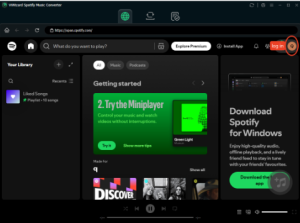
Install and open ViWizard Spotify Music Converter on your computer. The built-in Spotify web player allows you to log in, browse and select the music you want to convert.
Step 2: Add Spotify Songs or Playlists
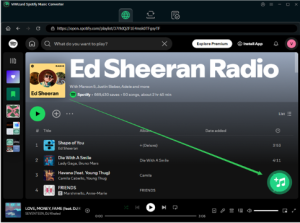
Search for your favorite songs, albums, or playlists in Spotify. Add the selected tracks to the conversion list with one click (to the button +).
Step 3: Choose MP3 as the Output Format
Open the settings menu and select MP3 as the output format. You can also customize audio quality settings according to your needs.
Step 4: Convert Spotify Music to MP3
Click the Convert button to start the process. When the conversion is complete, you can find the MP3 files in the output folder and transfer them to your preferred device.
Method 2: Use Spotify Offline Mode
Spotify’s built-in download feature is another option for offline listening. However, this method requires a Spotify Premium subscription and does not create actual MP3 files.
With Spotify offline mode, you can:
- Download playlists inside the Spotify app
- Listen without an internet connection
- Save mobile data
However, downloaded songs remain locked within Spotify and disappear if your subscription expires. Therefore, this method is suitable only for users who want offline playback inside Spotify.
Method 3: Record Spotify Music as MP3
Another possible way is using audio recording software to capture Spotify playback and save it as MP3. However, this method usually requires playing songs in real time, which can be inconvenient for large playlists.
Compared with recording, a Spotify music converter provides a faster workflow because it can process multiple tracks automatically while preserving song information.
Why Choose ViWizard Spotify Music Converter?
There are many Spotify download tools available online, but many free online converters have limitations, including poor audio quality, annoying ads, and limited download options.
ViWizard Spotify Music Converter offers a more convenient experience by allowing users to convert Spotify music directly into commonly used audio formats. It is designed for users who want better control over their Spotify music collection, including choosing output formats, managing playlists, and keeping music information organized.
Whether you want to save your favorite playlist, transfer Spotify songs to an MP3 player, or enjoy music offline without app restrictions, ViWizard provides an efficient way to convert Spotify music into MP3 files.
Conclusion
Downloading Spotify music to MP3 gives you more freedom to enjoy your favorite songs on different devices. While Spotify Premium only allows offline listening within the Spotify app, tools like ViWizard Spotify Music Converter make it possible to convert Spotify tracks into MP3 files with high-quality output and preserved metadata.
If you are looking for a simple way to create a personal Spotify music library and enjoy your favorite songs anytime, try ViWizard Spotify Music Converter and start converting Spotify music to MP3 today.

