


Lecture software becomes valuable when it helps after the class ends. A recording may feel reassuring in the moment, but students rarely have time to replay an entire seminar. A transcript helps, but long transcripts can become their own reading assignment. While reviewing LectMate, I focused on whether the product points toward searchable study notes rather than passive audio storage.
The homepage sets up a complete lecture record
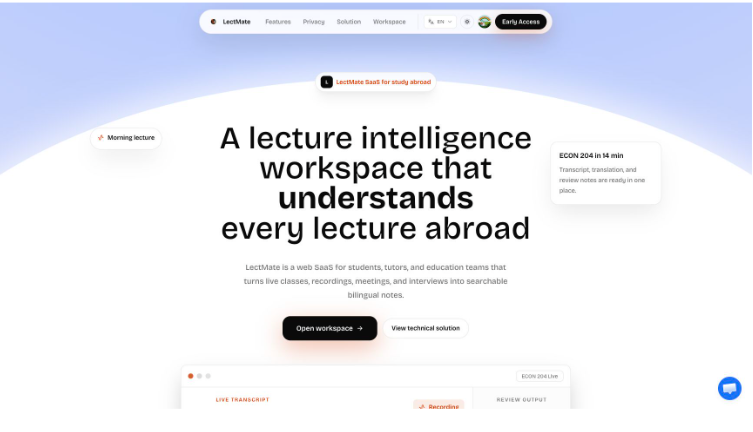
The first screen shows a product that understands the difference between capturing speech and creating a learning record. The classroom mock console includes speaker names, transcript text, translation, keywords, a summary label, and actions. It is not just “record and transcribe.” It is “record, translate, summarize, search, and export.”
The site describes the product as a web SaaS for students, tutors, and education teams. That multi-user framing is useful. Students need personal revision. Tutors need to see where a learner may have missed context. Education teams may need consistent records for lectures or support sessions. The same core workflow can serve all of those needs if the product preserves structure well.
People may type the brand as Lect Mate when searching for a study helper, but the product identity is clearly LectMate. The copy also says the tool can support meetings, interviews, calls, and conversations, which makes sense because the same pattern applies: spoken information becomes valuable only when it is organized for later use.
The homepage also makes a subtle but important claim through its layout: the transcript, translation, keywords, and actions belong together. That is the difference between a recording archive and a study workspace. A recording archive stores what happened. A study workspace helps the student do something with it.
Translation and notes are the real differentiators
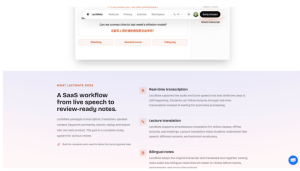
Real-time transcription is helpful, but it is not enough for many international students. The product’s emphasis on lecture translation and bilingual notes is what makes the workflow more interesting. A student may understand a lecture in real time yet still want a translated explanation for revision. Another student may want the original language preserved for quotes, terminology, or teacher phrasing.
LectMate’s feature section keeps both needs visible. The original transcript and translated text can sit together. Keywords and summaries can reduce a long session into a first review path. Search and replay can help the student return to the exact audio moment behind a concept. Import and export controls make the record portable rather than locked inside one interface.
This matters most during revision. A student preparing for an exam does not need a beautiful transcript; they need a reliable path back to the ideas that matter. A bilingual note system can help them confirm meaning, compare vocabulary, and keep source context nearby.
This is especially valuable in technical courses. A translated word may not carry the exact meaning of an economics, law, or engineering term. Keeping the source sentence near the translated explanation gives the student a way to compare terms and avoid studying a simplified version that loses precision. That is why bilingual notes are more useful than a one-time translation.
The same idea applies to interviews and research calls. A translated summary can help with quick understanding, but the original phrase may still matter when the student writes a report or checks a quote. A workspace that preserves both layers can serve quick review and careful verification.
The workspace is ready for real lecture habits
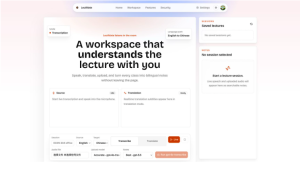
The workspace screen I observed was in an idle state, but it already showed practical controls. There are options for transcription and translation, language direction, live mode, audio file upload, upload model choice, notes model choice, saved sessions, and a notes area. That is a sensible layout because students may arrive with different sources: a live class, a recorded lecture, a meeting file, or an interview.
The model choices also suggest that LectMate is designed for tradeoffs. An accurate model may be better for high-stakes coursework. A lower-cost model may be enough for casual review. A speaker-aware model can matter in seminars, group discussions, or interviews. Notes models then turn the transcript into the study layer.
The next review step would be a full audio test with a short safe sample, but I would treat that as a separate run because it may create data or consume AI processing. For this review, the page and workspace were enough to show a coherent product direction: LectMate is trying to make lecture speech searchable, bilingual, and ready for actual study.
The strongest use case I can imagine is a recurring class with dense verbal explanations: economics seminars, history lectures, design critiques, legal classes, or language-heavy business courses. In those settings, a searchable record with translation and notes can reduce the cost of returning to the material. The student no longer has to choose between listening carefully and writing everything down.
That tradeoff is the heart of the product. Many students either listen well and leave with weak notes, or write constantly and miss the nuance of the lecture. LectMate’s promise is that the student can stay present while the workspace preserves enough structure for the second pass.

