


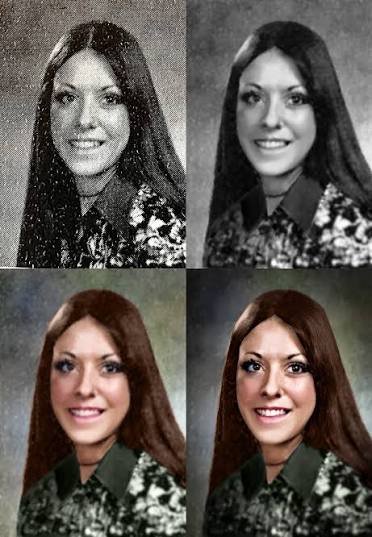
Low-resolution photos can be frustrating. An image may look acceptable on a smartphone screen, but once you zoom in, share it online, or print it, the flaws become obvious. Blurry edges, pixelation, and missing details can make an otherwise great photo look unprofessional. Fortunately, you no longer need advanced editing skills or expensive software to solve this problem. An Image enhancer powered by artificial intelligence can help users mejorar calidad de imagen quickly and effectively, often with just a few clicks.
Whether you’re working with old family photos, social media images, product photos, or downloaded pictures, modern AI technology makes it easier than ever to improve image quality without using Photoshop.
What Is a Low-Resolution Photo?
A low-resolution photo contains fewer pixels than needed for a particular use case. Pixels are the tiny dots that make up a digital image. The fewer pixels an image has, the less detail it contains.
When a low-resolution image is enlarged or displayed on larger screens, it often shows visible issues such as:
- Pixelation
- Blurry details
- Jagged edges
- Poor sharpness
- Loss of texture
This problem commonly occurs when images are downloaded from social media, compressed by messaging apps, or captured using older devices.
Why Photos Lose Resolution
Many people assume their original image quality remains unchanged after sharing or downloading a photo. In reality, several factors can reduce image resolution.
Social Media Compression
Platforms like Instagram, Facebook, TikTok, and X automatically compress images to reduce file size. While this improves loading speed, it often reduces visual quality.
Messaging Apps
Apps such as WhatsApp, Messenger, and Telegram frequently compress photos before sending them. This can significantly reduce image clarity.
Screenshots
Taking screenshots instead of saving original images often results in lower-quality files. Screenshots usually contain fewer pixels than the original image.
Older Cameras and Smartphones
Images captured years ago may have been taken with lower-resolution sensors. While they may have looked good at the time, modern displays reveal their limitations.
Excessive Editing
Repeatedly saving, resizing, or exporting images can gradually reduce image quality, especially when using compressed file formats.
Why Photoshop Isn’t Always the Best Solution
Photoshop is a powerful image editing tool, but it isn’t necessarily the easiest option for everyone.
Many users face several challenges:
- Steep learning curve
- Expensive subscription costs
- Time-consuming editing process
- Complex tools and settings
For someone who simply wants to improve image quality, Photoshop can feel overwhelming.
This is one reason AI-powered image enhancement tools have become so popular. They offer fast results without requiring professional editing experience.
How AI Fixes Low-Resolution Photos
Artificial intelligence has transformed image enhancement over the past few years.
Instead of simply enlarging an image, AI analyzes patterns, textures, objects, and edges within the photo. It then predicts what additional details should look like and generates new pixels accordingly.
This process helps improve clarity while preserving a natural appearance.
Modern AI image enhancement tools can:
- Increase image resolution
- Reduce blur
- Sharpen details
- Restore textures
- Improve facial features
- Reduce noise and grain
The result is often far superior to traditional resizing methods.
AI Upscaling vs Traditional Resizing
Traditional image enlargement simply stretches existing pixels across a larger area. This often creates blurry and pixelated results because no new information is added.
AI upscaling works differently.
The technology uses machine learning models trained on millions of images. By understanding how faces, landscapes, objects, and textures should appear, AI can intelligently reconstruct missing details.
For example, when enlarging a portrait, AI may improve hair texture, facial features, and clothing details that would otherwise appear soft or blurry.
This makes AI upscaling one of the most effective ways to fix low-resolution photos without Photoshop.
Common Types of Photos That Benefit From AI Enhancement
AI image enhancement works well across many different image categories.
Old Family Photos
Historical photographs often suffer from low resolution, fading, and blur. AI can restore detail and improve clarity while preserving the original character of the image.
Social Media Downloads
Photos saved from social media platforms often lose quality due to compression. AI can help recover sharpness and improve visual appearance.
Product Images
Ecommerce sellers frequently use AI enhancement to improve product photos before uploading them to online marketplaces or websites.
Portrait Photography
Portraits often benefit from improved facial details, sharper eyes, and better overall clarity.
Travel Photos
Vacation photos taken years ago can often be enhanced for modern displays and printing.
Additional Ways to Improve Image Quality
While AI enhancement is highly effective, there are several additional steps that can improve results even further.
Start With the Best Available Source
Always use the highest-quality version of an image whenever possible. AI performs best when it has more original information to work with.
Avoid Repeated Compression
Try not to repeatedly download, upload, and resave images. Every round of compression can reduce image quality.
Improve Lighting and Contrast
Enhancing brightness, contrast, and color balance can make an image appear sharper and more visually appealing.
Reduce Noise
Images taken in low-light conditions often contain grain or noise. AI tools can help remove these artifacts while preserving important details.
Can AI Fix Extremely Poor Images?
Many users wonder whether AI can completely restore severely damaged or extremely low-resolution photos.
The answer depends on the source image.
AI can significantly improve many photos, but it cannot recreate information that never existed. If an image is extremely blurry or contains very few pixels, there may be limitations to what can be restored.
However, even challenging images often show noticeable improvements after AI enhancement.
The best results typically come from photos that still retain some visible detail, even if they appear soft or pixelated.
Benefits of Using AI Image Enhancement
The growing popularity of AI enhancement is driven by several key advantages.
Fast Results
Many tools can process images within seconds or minutes.
No Technical Skills Required
Users do not need professional editing experience to achieve high-quality results.
Cost-Effective
Many AI tools are more affordable than professional editing software subscriptions.
Better Print Quality
Enhanced images are often better suited for posters, photo books, and large-format printing.
Improved Social Media Content
Sharper images tend to perform better and create a stronger visual impression online.
Who Uses AI Image Enhancement?
AI image enhancement is no longer limited to professional photographers.
Today, a wide range of users benefit from this technology:
- Content creators
- Social media managers
- Ecommerce sellers
- Graphic designers
- Small businesses
- Students
- Families preserving old photos
As AI tools become more accessible, image enhancement is becoming part of everyday digital workflows.
The Future of Image Enhancement
Artificial intelligence continues to improve rapidly. New models are becoming more accurate at recognizing textures, restoring details, and increasing image resolution.
Future AI tools may automatically optimize images for specific purposes, such as social media posts, ecommerce listings, website banners, or large-format printing.
As these technologies evolve, fixing low-resolution photos will become even easier and more accessible for everyday users.
Final Thoughts
Low-resolution photos no longer have to remain blurry, pixelated, or unusable. Thanks to advances in artificial intelligence, anyone can improve image quality without learning Photoshop or investing in complex editing software.
AI-powered image enhancement tools provide a simple and efficient way to increase resolution, sharpen details, reduce blur, and restore clarity. Whether you’re improving old family photos, enhancing social media content, preparing images for printing, or upgrading product photography, modern AI technology offers a practical solution for transforming low-quality images into sharper, more professional-looking visuals.

