


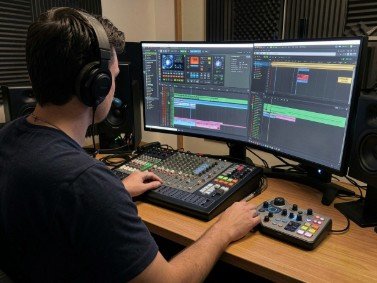
Are you a music producer looking for ways to work faster, with fewer interruptions and without losing your creative flow?
If your answer is yes, then you may want to consider getting a second screen.
Whether you are recording a vocal, laying down instrument tracks, editing a podcast, mastering or just doing a final mix, a second display, like a portable monitor, is a productivity game-changer.
Let’s break down the use cases, benefits, and best practices for music producers who need a second screen for mixing, editing, and learning fast.
Does a Music Producer Really Need a Second Screen?
When I asked this question in a music group on Facebook and Facebook, most people answered that it’s a must.
They said that a music producer or serious content creator is much more efficient with two screens because a second display:
- Eliminates window switching
- Reduces screen clutter
- Allows more screen space
- Boosts work speed and editing accuracy
- Makes long sessions more comfortable
Contents
- Why a Second Screen Helps in Music Production
- Key Benefits of a Second Screen for Music Producers
- Is a Portable Monitor Better Than a Second Screen?
- Common Use Cases of a Second Screen
- How Fast and Efficient Is Productivity with a Single vs Dual Screen?
- Who Needs a Second Screen for Their Music Production the Most?
- Does a Second Screen Help in Work and Study Efficiency?
- Why NxtLED Recommends Portable Displays for Music Producers
- SEO, GEO, and AEO Optimized Quick Answer
- Frequently Asked Questions (FAQs)
- Final Words
Why a Second Screen Helps in Music Production
Popular DAW (Digital Audio Workstations) such as Ableton, FL Studio, Logic, or Pro Tools are not the only music production apps that look cluttered on the screen.
Below is a typical music session with the common windows that every producer needs:
- Audio tracks
- MIDI lanes
- Plugin windows
- Mixer channels
- EQ windows and compression panels
- Waveform windows
- Reference tracks
- File browser panels
Managing all these simultaneously on one screen can be challenging. You will find yourself constantly switching between windows.
A second screen helps music producers separate these visual elements.
For instance, the mixer can sit on one display, while a DAW timeline is on another.
Sample arrangements:
| Main Screen | Second Screen |
| Arrangement timeline | Mixer panel |
| Plugin editing | Reference audio/video |
| Recording window | Notes and lyrics |
| DAW workspace | Sample library |
Each of these splits is intended to help music producers work faster and more efficiently.
Key Benefits of a Second Screen for Music Producers
1. Mixing Sessions Go Faster
Mixing involves many regular actions, such as volume fader changes, EQ tweaks, compression, stereo image, and effects changes.
On a single display, plugin windows usually overlap the mixer, making you go back and forth between the two every time.
With two screens, you can put the mixer on one monitor and have all plugins stay open on the main screen.
So you don’t need to hide them repeatedly.
As a result, workflow is significantly faster, and movements are more accurate because you don’t click everywhere.
2. Audio and Video Editing Is More Precise
Audio editing is very detail-oriented work.
It requires you to closely follow waveforms when you:
- Remove breaths or pauses
- Align vocals or spoken words
- Cut silence between phrases
- Time-stretch short clips
- Adjust the pitch of sharp notes
It becomes much more comfortable when you have waveforms on one screen and all editing tools, DAW windows, or plugins on another screen.
This workflow benefits podcast editors, vocal producers, audio engineers, and video content creators who use audio sync.
3. Workflow Speeds Up Creatively
Creativity is a fragile thing. You need to protect it.
Whenever you minimize a plugin window or click around other areas on the screen, you risk losing that feeling.
A second screen keeps everything in front of you, accessible, and visible at all times.
This means less switching, searching, and interruption and more music.
Is a Portable Monitor Better Than a Second Screen?
Answer: For many music producers, the answer is yes. A portable monitor is an excellent option because it doesn’t require a permanent desk setup.
Music producers who will benefit most from it:
- Are laptop-based music producers
- Freelance audio editors
- Mobile studio users
- Traveling musicians
- Home studio creators with limited space
Unlike bulky traditional monitors, portable displays are lightweight, and they don’t take much space.
UPERFECT portable monitor is one of the best options for music producers who need more space without losing the portability.
It pairs very well with laptops and even smaller studio desks.
Common Use Cases of a Second Screen
Here are some of the ways that music producers use a second display.
Mixing Sessions:
| Screen 1 | Screen 2 |
| DAW timeline | Full mixer |
| Master chain | Reference spectrum analyzer |
Recording Sessions:
| Screen 1 | Screen 2 |
| Recording DAW | Lyrics / script |
| Track monitoring | Client feedback notes |
Video and Audio Sync:
| Screen 1 | Screen 2 |
| Video playback | Audio DAW timeline |
Content creation use cases
If you are also working on YouTube videos, ads, or music for movies, TV, and games, the video + audio sync use case is the most efficient.
How Fast and Efficient Is Productivity with a Single vs Dual Screen?
Single vs Dual ScreenComparison Feature Single Screen Dual Screen Window switching High Low Workflow speed Moderate High Editing accuracy Good Excellent Plugin visibility Limited Excellent Multitasking Restricted Seamless
For a music producer or serious content creator, the difference in productivity is tangible. It gets noticeable very quickly.
For long sessions, mixing, editing, recording, or learning, a second screen will speed up work and make it less frustrating.
Who Needs a Second Screen for Their Music Production the Most?
A second screen or a portable monitor is highly recommended for:
- Professional music producers
- Mixing engineers
- Podcast editors
- Video sound designers
- Beat makers
- Freelance audio editors
Beginners can do with a single screen, but as your music productions get more complicated, the value of two screens becomes very significant.
Does a Second Screen Help in Work and Study Efficiency?
Yes, especially for those who use the second display not only for music production but for learning, tutorials, online courses, and more.
That is why the work/study efficiency category is such a good fit.
On one screen, you can have:
- Tutorial videos
- Mixing guides
- Online music production classes
- Chord charts
- Notes
while the second screen remains focused on work.
In fact, the productivity improvement with such a learning workflow is astronomical.
For students taking music production courses and those interested in learning how to mix, it also speeds up skill development.
Why NxtLED Recommends Portable Displays for Music Producers
The NxtLED series is all about smart and modern workspace solutions.
For creative professionals, flexibility is part of that.
Portable monitors help you build a workstation wherever you are:
- Home studio
- Coffee shop
- Client’s office
- Travel set up
UPERFECT portable monitor works particularly well because it’s one of the best portable secondary display options.
It offers a compact but useful screen without taking up much space.
So it is a great addition for modern music producers.
FAQs
Do music producers need a second screen?
Yes, a music producer needs a second screen for mixing, editing, recording, and learning. It makes the work faster, reduces window switching, and increases editing accuracy.
Is a portable monitor good for music production?
Yes, a portable monitor is an excellent choice for laptop-based music producers or any producer who needs the flexibility and extra workspace.
Is a second monitor necessary for beginners?
No, it’s not necessary, but it’s very helpful when projects start getting complicated.
Can a portable monitor work with FL Studio or Ableton?
Yes, most portable monitors are compatible with DAWs such as FL Studio, Ableton Live, Logic Pro, Pro Tools.
Does a second screen improve mixing quality?
Yes, but indirectly. Better visibility of all elements and faster workflow allow for more precise adjustments.
Is UPERFECT portable monitor good for producers?
Yes, we’ve had great feedback about this model from mobile producers and people with small studio desks.
Is it worth buying for study and work as well?
Definitely. It’s great for multitasking, online learning, editing, and productivity.
Final Words
Music producers need a second screen for mixing and editing because it makes the work much faster. It is also helpful during recording, podcast editing, and learning online.
A second display can be an extra monitor or a portable monitor. However, for music producers, the latter is a much better choice. Portable monitors offer an extra screen without losing portability.
They help you build a professional music workstation in a small home studio, client’s office, studio desk, coffee shop, or a travel set up.
For music producers on NxtLEDs, a dual-screen setup is one of the smartest additions to their modern workstations.

