


The gap between a working game prototype and a shippable product is often measured in sprite sheets. For every independent developer who has ever stared at a greyboxed character controller and thought, “now I just need to draw forty frames of animation,” the math has always been brutal. A single walking cycle in Aseprite can consume an entire weekend. A complete character—idle, walk, run, attack, death—easily crosses twenty hours of work, assuming you already know how to draw. And if you do not, the alternative is hiring a professional at five hundred to five thousand dollars per character. That is not a bottleneck. That is a wall. AI Sprite Generator enters this conversation not as another AI art toy, but as a serious attempt to tear that wall down. After spending several days putting it through a real production-style test, the results suggest that for a significant portion of indie game development, the trade-offs have shifted.
The Real Cost of Consistency: Why Traditional Sprite Work Hurts
The surface-level problem with manual sprite creation is time. Two hours per frame adds up quickly. But the deeper, more corrosive problem is consistency. When you draw frame one of a walking cycle, you are fresh. By frame thirty, your hand is tired, your eye has adjusted, and the character’s line weight has drifted. The color you mixed at the start no longer matches the color you are mixing now. The proportions lean slightly differently. This is not a skill issue—it is a human limitation. Professional studios solve it with style guides, reference sheets, and layers of quality control. Indie developers solve it by hoping nobody notices.
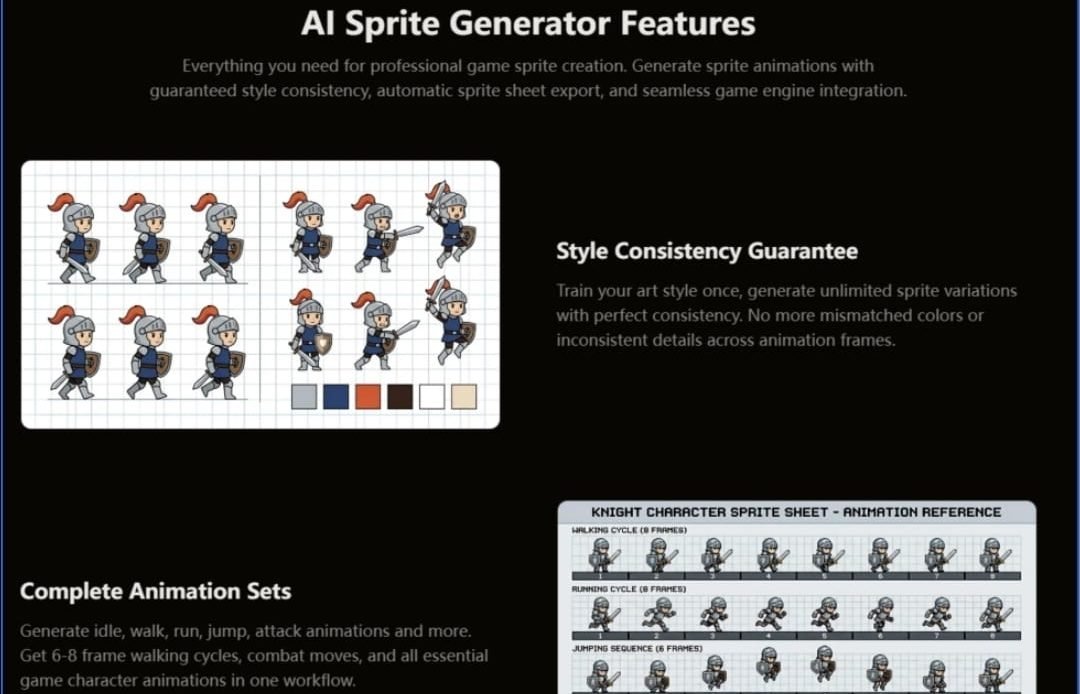
The platform’s approach to this problem is worth examining closely because it does not pretend AI magically understands art. Instead, it asks for three to five reference images—your own character sketches, screenshots of your preferred pixel art, or even concept pieces you have commissioned. From those, the system extracts a locked palette, line thickness parameters, detail density, and proportional rules. Once that style is trained, every generated frame uses only those approved colors and follows those locked parameters. In practice, this means the attack animation you generate six months after your walking cycle will share the same visual DNA. Frame one and frame one hundred look like they came from the same hand. That is not a minor convenience. It is the difference between a game that feels cohesive and one that feels stitched together from asset packs.
From Concept to Sprite Sheet: A Production Workflow in Three Steps
The platform’s interface strips away the usual AI art complexity. There is no prompt engineering degree required. The workflow follows a logical path that mirrors how a developer actually thinks about character creation.
Step One: Establishing the Visual Foundation
Upload, Describe, or Reference
The starting point is flexible. You can upload an existing character image, type a description of what you want, or select a style preset such as pixel art, 2D cartoon, or anime. For developers who already have an established visual direction, the reference image route is the most powerful. Uploading three to five samples trains the style lock, which becomes the guardrail for everything that follows. This is not a one-time setup either—once the style is trained, it persists across sessions, meaning you can generate a hero character today and return next week to generate NPC variants without re-establishing the visual rules. The practical implication is that a small team or solo developer can build an entire cast of characters that share a unified aesthetic, something that traditionally requires a dedicated art director.
Step Two: Generating the Animation Set
Select, Configure, and Generate
With the style locked in, the next step is choosing the animation type. The available set covers the essential game character vocabulary: idle loops, walk cycles (typically six to eight frames), run, jump, attack animations (melee, ranged, magic cast), hit reactions, death sequences, and more advanced options like crouch, roll, climb, and victory poses. For top-down or isometric games, there is directional support that generates four or eight angles from a single character base. This is particularly valuable for RPG and strategy developers who need consistent sprites from every viewing angle. The frame count is adjustable, as is the frame rate—eight frames per second for retro pixel art, up to twelve to twenty-four for smoother modern 2D animations. The generation itself completes in under sixty seconds, which is fast enough that iterative experimentation becomes practical. Want to see what a six-frame walk looks like versus a ten-frame version? Generate both. The time cost is negligible.
Step Three: Exporting for the Engine
One-Click Integration, Not Just Download
This is where the platform distinguishes itself from generic AI image generators. The export options are tailored for game development pipelines rather than casual use. You can download animations as APNG, GIF, or ZIP archives of individual frames. But the real value is in the one-click engine exports. For Unity, the output includes a sprite sheet atlas in PNG format, JSON metadata with frame positions and durations, an animation controller preset, and collision box suggestions. For Godot, it produces AnimatedSprite-compatible formats with.tres resource files and properly named sprite frames. For Unreal, it generates Paper2D-compatible sprite sheets with flipbook data. This means the generated assets drop into the engine with minimal manual setup—no frame-by-frame slicing, no timeline configuration, no guessing frame order. The system handles the tedious mapping so you can focus on gameplay.
Testing the Promises: What Actually Happens in Practice
To evaluate the platform honestly, I ran a series of tests across different character types and animation needs. The goal was not to find the perfect use case but to understand where the tool excels and where it still requires human judgment.
The Walking Cycle Test: Speed Versus Control
The first test was a standard side-view walking cycle for a fantasy knight character. I uploaded three reference images—a front view, a side view, and a concept sketch—and let the style lock train. The generation produced an eight-frame walk cycle in about forty-five seconds. The frames were consistent in color and line weight, and the leg movement followed a reasonable gait pattern. The result was immediately usable for prototyping. The trade-off was that the walk cycle had a slightly mechanical quality—perfectly consistent, but lacking the subtle weight shifts that a skilled animator might add. For a game jam or early prototype, this is a non-issue. For a hero character in a narrative-driven game, you would likely want to bring the frames into Aseprite for polish. The platform itself acknowledges this workflow, suggesting that developers use it for the bulk of their sprites and reserve manual tools for hero characters.
The Directional Sprite Test: Efficiency at Scale
The second test involved generating an eight-directional sprite set for an isometric RPG character. This is the kind of task that traditionally kills indie projects—forty-eight frames for a single character if you include all animations across all directions. The platform handled this by generating one character base and automatically producing all eight angles. The result was visually consistent across every direction, which is surprisingly difficult to achieve manually. The limitation was that the directional generation works best when the character design is relatively symmetrical. Asymmetrical details—a shield on one arm, a cape that flows differently from each angle—required some manual adjustment after export. For standard RPG characters with symmetric equipment, the efficiency gain was enormous.
The Variation Test: Changing Colors Without Redrawing
The third test explored character variations. I generated a base character, then modified the color palette to create different armor tiers and equipment sets. The platform regenerated the entire animation set with the new colors in about three minutes. Doing this manually would have required redrawing every frame for every variation—easily twenty hours of work. The generated variations were consistent with each other and with the base character. The only caveat was that the palette changes applied globally, meaning you could not selectively recolor individual parts of the character without creating a new style reference. For most use cases—different enemy tiers, player color options, NPC variations—this was more than adequate.
A Practical Comparison: Where This Fits in the Development Pipeline
To put the platform in context, it helps to compare it against the alternatives that indie developers actually consider.
| Approach | Time per Character | Skill Required | Consistency | Cost | Best For |
| Manual pixel art (Aseprite) | 20–40+ hours | High | Variable, depends on artist | Time + opportunity cost | Hero characters, bespoke art |
| Asset packs | Instant | None | Matches pack, not your game | $20–200 | Prototyping, generic projects |
| AI sprite generator | 20–60 minutes | None | Locked and guaranteed | Under $5 per character | Bulk sprites, NPCs, rapid prototyping, game jams |
| Hiring a professional | 1–2 weeks | None (outsourced) | High, if well-directed | $500–$5,000 | Full production with budget |
The table reveals the platform’s natural position. It is not a replacement for a master pixel artist creating a flagship character. It is a force multiplier for everything else—the forty NPCs in your RPG town, the enemy variants in your roguelike, the character customization options in your idle game. In my testing, the most productive workflow was to generate all base animations in the platform, then selectively polish a few key frames in Aseprite. This hybrid approach delivered production-ready assets in a fraction of the time while preserving the option for artisanal refinement where it mattered most.
Real Limitations: What the Platform Does Not Do
A responsible evaluation must acknowledge what the tool cannot yet deliver. First, the quality of the output depends heavily on the quality of the reference images. Uploading three rough sketches will produce rough results. The platform works best when the references are clear and representative of the desired final style. Second, complex or highly stylized characters—those with intricate armor, flowing capes, or non-human proportions—may require multiple generation attempts to get right. The result may vary, and in some cases, manual adjustment is still necessary. Third, the platform does not generate background assets, UI elements, or environmental sprites. It is focused specifically on character animations, which is a deliberate scope choice rather than a limitation, but it is worth noting for developers expecting a full asset pipeline. Finally, the style lock, while powerful, is not infinitely flexible. Drastic changes to a character’s equipment or silhouette may require retraining the style rather than simply adjusting parameters.
The Verdict: Who Should Use This and When
After working through multiple character sets and animation types, the platform’s value proposition becomes clear. For solo indie developers participating in game jams, it is transformative—the difference between submitting a game with custom sprites versus generic asset packs. For RPG and strategy developers building large casts of characters, it solves the consistency problem that plagues multi-character projects. For programmers with no art background, it removes the single biggest barrier to shipping a visually cohesive game.
The platform is less suited for teams with dedicated pixel artists who prioritize bespoke, hand-crafted animation. It is also not the right tool for projects where every frame needs to convey specific emotional or narrative weight—those moments still benefit from human intuition. But for the vast middle ground of game development—the prototypes, the NPCs, the enemy hordes, the character variations—the trade-off between speed and polish leans heavily in favor of generation.
The most honest takeaway from this testing is that the platform does not eliminate the need for artistic judgment. It eliminates the need for artistic execution. You still need to decide what looks good, what fits your game’s tone, and what needs refinement. But you no longer need to spend forty hours drawing it. That is not a small thing. It is the difference between building the game you imagine and settling for the game you can afford to draw. AI Sprite Generator makes that difference tangible, and for a growing number of indie developers, that is exactly the shift they have been waiting for.

