


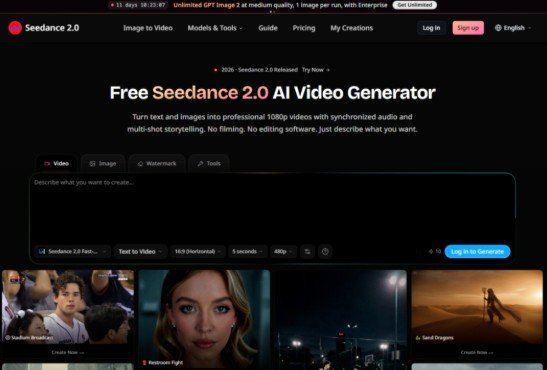
For the past two years, testing AI video generators has felt like playing a lottery with expensive tickets. You write a prompt, cross your fingers, and hope the model doesn’t turn a hand into a pretzel or drift a character into a void. Then ByteDance released Seedance 2.0 in February 2026, and suddenly the conversation shifted from “can AI generate video” to “can AI direct a scene”. Seedance 2.0 doesn’t just produce moving pixels—it produces sequences with intent. After running it through a month of real production tests, here’s what actually happens when you stop prompting and start directing.
The Director’s Dashboard: What Sets Seedance 2.0 Apart
Most video models treat your prompt as a suggestion. Seedance 2.0 treats it as a shot list. Built on a unified multimodal audio-video joint generation architecture, the model accepts text, images, audio, and video as simultaneous inputs. You can feed it up to nine reference images, three video clips, and three audio files in a single generation. The model then references composition, motion, camera movement, visual effects, and audio from those assets—breaking the material boundaries that have historically made AI video feel disjointed.
What makes this practical rather than theoretical is the reference system. You label inputs as [Image1], [Video1], [Audio1] in your prompt, then direct the model like a studio editor: “The character from [Image1] performs the dance from [Video1]”. This isn’t prompt engineering—it’s shot composition. The model maintains facial features, clothing, and style across generated sequences when using reference images, which means multi-shot narratives finally hold together.
Putting It to the Test: Three Real-World Scenarios
Scenario 1: Multi-Shot Narrative with Character Consistency
The task: Generate a 15-second sequence showing a character moving through three distinct environments with consistent appearance and clothing.
The challenge: Traditional models break character identity across cuts. A jacket changes color. Facial features shift. The scene becomes a collage of unrelated frames.
The actual performance: Seedance 2.0 maintained the protagonist’s deep blue costume and facial structure across all three environments in my testing. The model preserved the visual logic of the sequence—not just frame-to-frame consistency, but scene-to-scene coherence. When I used a reference image to establish the character, the model held that identity through cuts, lighting changes, and camera angle shifts.
What worked: The reference system eliminated the “who is this person now?” problem that plagues multi-shot AI video. Each cut felt like the same character, not a cosplayer.
What didn’t: Complex wardrobe details—like patterned fabrics or layered accessories—required more specific prompting. The model handles solid colors and simple textures reliably; intricate patterns may need multiple attempts.
Best for: Narrative shorts, character-driven commercials, and any project requiring a protagonist who actually looks like the same person from opening to closing frame.
Scenario 2: Physical Motion and Realistic Interaction
The task: Generate a competitive figure skating sequence with synchronized takeoffs, mid-air spins, and precise landings.
The challenge: AI video historically fails at physics. Objects phase through each other. Characters float. Weight doesn’t exist.
The actual performance: The model delivered motion that followed real-world physical laws. In the skating test, the sequence included a brief recovery moment—the male skater’s axis deviation caused a rhythm disruption, and the female skater adjusted her center of gravity to guide him back into alignment. That level of choreographed recovery isn’t just motion; it’s narrative physics. The model understood cause and effect in movement.
What worked: Complex interactions—two characters moving in coordination—rendered without the usual floating or clipping. Collisions had weight. Transitions felt continuous rather than stitched.
What didn’t: Fast, chaotic motion with multiple overlapping subjects occasionally produced soft edges. The model prefers clear, defined action over dense melee scenes.
Best for: Sports visualization, action sequences, product demonstrations where movement quality matters more than static beauty.
Scenario 3: Multimodal Reference Composition
The task: Combine a reference image for visual style, a reference video for motion, and a reference audio clip for rhythm—then generate a new scene that integrates all three.
The challenge: Most models treat each input independently. You get either the style or the motion, rarely both with audio sync.
The actual performance: This is where Seedance 2.0 separates from the pack. The model referenced composition from the image, camera movement from the video, and audio timing from the clip—then synthesized a new sequence that honored all three. The audio generated natively alongside video, meaning dialogue, sound effects, and background music synchronized from the start rather than layered in post-production.
What worked: The “@” reference system made multi-input prompting precise rather than confusing. “Replace the cat in [Video1] with the lion from [Image1]” produced exactly that—no extra description needed.
What didn’t: Reference quality matters. Low-resolution inputs produced lower-quality outputs. The model works best with clean, well-composed references.
Best for: Brand campaigns with existing visual assets, music videos requiring beat-synced visuals, and any workflow where you already have material to build from.
The Workflow: How to Actually Use Seedance 2.0

Step 1: Define Your Input Mix
Text, Image, Video, or Audio—Choose Your Modality
Seedance 2.0 supports text-to-video, image-to-video, and multimodal reference-to-video. For text-only prompts, describe the scene, camera movement, lighting, and mood in natural language. For image-to-video, provide a starting frame and describe what should happen next. For multimodal reference, combine up to nine images, three video clips, and three audio files in a single generation.
The model understands multi-subject interactions, camera movements, and emotional tone from text alone. For dialogue, put speech in double quotes—the model generates matching lip movements and voice.
Step 2: Structure Your References
Label Everything, Direct Everything
When using reference inputs, label them in your prompt: “The character from [Image1] performs the dance from [Video1]”. This structured approach eliminates ambiguity. For video editing, describe what to change and what to keep: “Replace the perfume in [Video1] with the face cream from [Image1], keeping all original motion”.
Step 3: Set Duration and Resolution
Start Short, Then Scale
The model supports video generation up to 15 seconds in a single generation. Start with shorter durations—five seconds—while experimenting with style and composition. Once you’re happy with the direction, increase duration. The model also offers an intelligent duration setting: set duration to -1 and let the model pick the best length for the content.
Resolution options include 480p and 720p across multiple aspect ratios: 16:9, 4:3, 1:1, 3:4, 9:16, and 21:9.
Step 4: Generate and Iterate
One Pass, Synchronized Output
The model generates video and audio together in a single pass. No separate audio generation step. No post-production sync. The output includes dialogue, sound effects, and background music synchronized with visuals from the start.
Where Seedance 2.0 Fits in Your Workflow
| Dimension | Seedance 2.0 | Traditional AI Video |
| Input flexibility | Text, image, video, audio combined | Text-only or single image |
| Character consistency | Maintains across multi-shot sequences | Breaks across cuts |
| Audio integration | Native, synchronized generation | Post-production add-on |
| Camera control | Director-level: dolly, rack focus, tracking | Basic movement only |
| Multi-shot logic | Coherent narrative structure | Disconnected fragments |
| Physical realism | Follows real-world physics | Floating, clipping common |
Real Limitations Worth Knowing
No tool is perfect, and Seedance 2.0 has genuine constraints. Prompt quality significantly influences results—vague prompts produce vague video. Complex scenes with multiple overlapping subjects may require multiple generations to get right. The model’s performance varies with input quality; low-resolution references produce lower-resolution output.
Character consistency works best when reference images are clean and well-lit. Fast, chaotic motion with many overlapping elements can produce soft edges or momentary blur. The model handles clear, defined action reliably; dense melee scenes or rapid camera cuts may need refinement.
In my testing, the results varied across attempts—not every generation lands perfectly on the first try. The model excels at structured, intentional prompting but doesn’t always interpret abstract or poetic descriptions with equal precision.

Who Should Build With Seedance 2.0
This isn’t a general-purpose tool for casual experimentation. seedance 2.0 fast serves creators who need control over the final frame—commercial directors, brand teams, game studios, and independent filmmakers working with existing assets. The multimodal reference system makes it particularly valuable for campaigns with established visual identities, product showcases requiring consistent styling, and any project where the output needs to match a specific brief rather than surprise you with something interesting.
For rapid prototyping and concept visualization, the model delivers studio-worthy output at production speed. For final production renders, the director-level camera control and native audio generation reduce post-production overhead significantly.
The question isn’t whether AI can generate video anymore. It’s whether you can direct it. Seedance 2.0 suggests the answer is finally yes—provided you’re ready to write shot lists, not just wish lists.

