


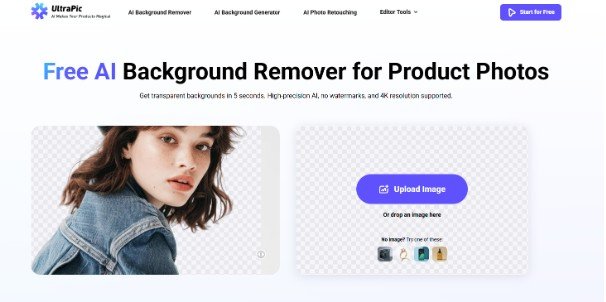
Still spending hours tracing edges, refining masks, and cleaning up details for background removal? Don’t bother! You can rely on a background remover, often powered by AI, that automatically detects and separates the subject (like a person or product) from the background in just a few clicks.
Whether you are editing product photos, creating social media content, or just experimenting with visuals, you can try the background remover below to erase background for free online, with no need for expensive software or advanced skills.
Online Background Remover for One-Click BG Removal [Free]
UltraPic is an AI-driven online background removal tool that focuses on speed and accuracy. Unlike traditional editors, it doesn’t rely on manual selection. Instead, it analyzes the image and automatically identifies the subject. Also, it offers to handle tasks like object cleanup, and image enhancement – all directly in your browser.
Let’s break down what makes UltraPic a strong choice for background erasing:
- 1-click background removal: It uses advanced AI to detect and isolate subjects instantly. You upload an image, and within seconds, the background disappears.
- High-precision edge detection: Fine details like hair and transparent objects are handled with impressive accuracy. This is where many tools fall short.
- Fast processing speed: The tool processes images quickly and it offers backdrop removal in batches, making it ideal for bulk editing of product images.
- Beginner-friendly interface: With a simple interface with minimal learning curve, and it runs in a browser directly, so you can access it anytime.
- High-quality output: Your images retain their original resolution, ensuring professional-grade results.
How to Erase Background for Free – Simple & Quick
Removing a background doesn’t have to be complicated. Here is how you can remove background from PNG, JPG, and other image files for free using UltraPic:
Step 1. Visit UltraPic and upload the image you want to edit.
Step 2. Once uploaded, the AI immediately starts analyzing the image and removes the background automatically. Then, you’ll see a real-time preview of the subject with a transparent background.
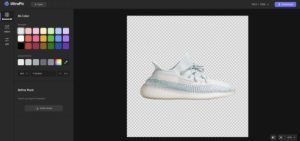
Step 3. If needed, use manual tools to fine-tune edges or restore small details. Then, export your final image.
Tips for better results:
- Use high-resolution images whenever possible
- Avoid overly complex or cluttered backgrounds
- Check edges carefully before downloading
- Experiment with different images to understand how the tool performs
Why Do You Need a Background Remover?
When you remove a background, you’re no longer tied to a specific setting. Your subject becomes adaptable, ready to fit into any design, layout, or visual concept. There are several reasons why people choose to erase background free:
- It improves the overall look of images by removing distractions
- It allows for creative freedom in design projects
- It enhances branding consistency across visuals
- It makes images more versatile for different platforms
- It helps highlight the main subject more effectively
Think about e-commerce, for example. Products with clean, transparent backgrounds look more professional and consistent. Or consider social media – images that stand out visually are more likely to grab attention.
Typical Scenarios for Using Background Remover
Background removal isn’t limited to one type of user. It’s used across industries, professions, and creative projects. Here are some common scenarios where background removal proves invaluable:
- eCommerce Product Photos – Remove messy backgrounds and replace them with clean, white ones for online stores.
- Social Media Content – Create eye-catching posts by isolating subjects and adding creative backgrounds.
- Marketing Materials – Design ads, banners, and posters with professional-looking visuals.
- Personal Projects – From profile pictures to invitations, background removal adds a polished touch.
- ID Photos and Resumes – Quickly create formal images with plain backgrounds.
Each scenario has its own requirements, but the goal remains the same: clean, distraction-free images. For instance, a small business owner might use UltraPic to quickly erase background free from product photos. A content creator, on the other hand, might use it to design eye-catching posts. Even students can benefit by enhancing visuals for projects and presentations.
In the End
Removing backgrounds used to be a tedious task reserved for professionals. Today, it’s accessible to everyone. With tools like UltraPic, you can erase background free in seconds, without sacrificing quality. Whether you’re working on personal projects or professional designs, having this feature will greatly improve your productivity.

