


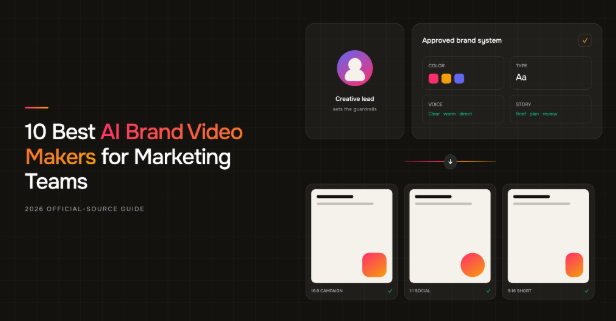
- ngram is the strongest overall choice for turning approved source material into a reviewable script, storyboard, and brand video in one workflow.
- Canva and Adobe Express are faster fits for template-led social production.
- Synthesia and HeyGen suit presenter-led video, while Visla gives teams a useful storyboard-first route.
- Test the complete approval loop, including one correction and two channel sizes, rather than judging one lucky generation.
The first draft usually is not the problem. The third round of “the logo moved,” “that is not our product screen,” and “we need this in three more sizes” is.
AI video platforms can make a marketing team faster, but speed has little value when every output returns to a designer or brand lead for repair. A useful AI brand video maker has to do more than remember a hex code. It should accept the material your team already trusts, preserve visual and verbal rules, expose the plan before expensive generation, and leave enough editing control to fix one weak scene.
This guide compares ten current options through that workflow lens. Product claims come from official product pages and help documentation checked on August 17, 2026. The ranking is editorial, the limitations sit beside the strengths, and no tool receives credit for a feature we could not verify.
The brand-consistency problem is a workflow problem
Brand inconsistency rarely arrives as one spectacular mistake. It accumulates in small decisions: the wrong typeface in a subtitle, a product label that changes between shots, a call to action that sounds unlike the company, or a vertical crop that hides the point of the scene. Each error looks fixable. Together, they turn a supposedly fast process into a queue of approvals.
The pressure to solve that queue is real. In Wyzowl’s 2026 video marketing survey, 91% of respondents said their business uses video, 63% of video marketers said they had used AI video tools, and 92% planned to spend the same or more on video during 2026. The same research found that 89% of consumers believe video quality affects their trust in a brand. More output and tighter review standards are arriving at the same time.
The planning burden is moving too. LinkedIn’s analysis of more than 13,000 B2B video ads likewise points to creative decisions as a major part of video effectiveness. The prompt matters, but the work around the prompt matters more.
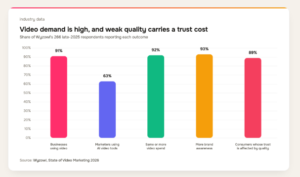
Wyzowl’s 2026 survey of 266 respondents shows both the demand for video and the trust cost of weak quality.
The practical answer is a six-stage loop: brief, rules, plan, draft, review, and channel variants. Human judgment belongs at the brief, plan, and approval stages. The software should carry approved decisions through the repetitive production work between them.
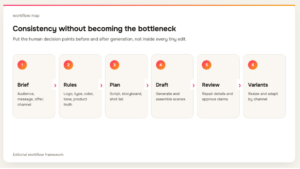
A polished clip can still come from a poor team workflow. If the tool cannot reuse approved assets, show a scene plan, or repair a single problem without rebuilding the video, the work will keep returning to the same approval queue.
How we chose the best AI brand video makers
We started with category fit. Every product had to work as an AI video creation tool for marketing or business use and remain active in current official documentation. We then evaluated six parts of the working process.
Saved brand control: Can the team reuse logos, colors, fonts, voice, media, or other brand rules? A simple asset drawer is useful, but governed defaults and reusable components carry more of the workload.
Useful starting inputs: Marketing rarely begins with an empty prompt. We looked for support for scripts, images, footage, web pages, documents, decks, recordings, and other approved source material.
Control before rendering: A reviewable script, outline, or storyboard can catch a weak message before the team spends time generating and repairing scenes.
Control after rendering: Teams need a realistic repair path. Scene editing, canvas controls, timelines, caption tools, and reusable video elements all reduce the chance of a full restart.
Collaboration and governance: Shared workspaces, comments, access controls, admin settings, and locked brand elements matter when a workflow expands beyond one maker.
Output reuse: Resize, aspect-ratio support, and multiple export formats determine whether one approved story can travel across campaign placements.
The list is fixed in a clear editorial order, but it is not a mathematical leaderboard. A template editor, an avatar studio, and a storyboard-first production system solve different problems. The number-one position goes to the most complete fit for a general marketing team, while every other entry identifies the narrower job it handles well.
What 10 official product pages reveal about brand control
To make the comparison less impressionistic, we ran a desk-research audit across the fixed set. A capability counted only when an official product or help page documented it on the review date. A blank means we did not find the feature in that source set. It does not prove that the product lacks it, so buyers should verify the point during a trial or sales conversation.
The most common capability is a saved brand system, documented by nine of the ten tools. Multi-format output or resizing also appears for nine. Team collaboration or review and an AI voice or presenter each appear for eight.
The gap appears earlier in the process. Only five document a reviewable plan before full rendering, and six document a URL or webpage input. That is where a marketing team’s existing knowledge can fall out of the workflow.
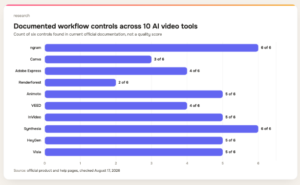
The six controls are a saved brand system, URL or webpage input, a reviewable pre-render plan, multi-format output or resizing, team review, and an AI voice or presenter. Counts describe documentation coverage, not output quality.
Starting-input coverage tells a similar story. Every tool accepts a prompt or script, and every one can work with images or footage in some form. Only six document a URL or webpage route, while three explicitly cover a PDF, document, or deck. A broad prompt box is now standard. The ability to reuse approved source material is still a differentiator.
The URL to video label also needs care. It does not describe one identical feature. Animoto documents a webpage-to-video starting route. Synthesia can take a URL into its Assistant. HeyGen uses a website URL to seed a Brand System. ngram can treat a URL as source material for the video workflow. A buyer should ask whether the page supplies facts for the script, assets for the visual system, or both. The wrong assumption may not surface until the first real campaign.
Pre-render planning varies in the same way. An AI storyboard generator may expose a scene-by-scene text breakdown, an editable storyboard, or an agent-created shot plan, but those checkpoints give the reviewer different control. During a pilot, change the audience, remove one unsupported claim, reorder two scenes, and replace one visual instruction before rendering. If those changes require a restart or fail to carry into production, the planning view is descriptive rather than operational.
Brand kits also vary in depth. Nine products document logos, colors, and fonts. Only three in the checked material document reusable intros or outros, and three document admin rules or enforceable defaults. An available asset library is useful, but it does not automatically govern how people use those assets.
That governance gap changes the day-to-day job. A creator may be able to find the right logo and still stretch it, move it into a poor safe zone, or pair it with an unapproved phrase. Ask whether the product can set defaults, restrict edits, preserve reusable motion elements, and separate admin control from creator access. When those controls are absent, the team needs a tighter template library and a clearer review owner outside the tool.
These patterns informed the recommendations below, but they do not replace a real pilot. A useful pilot uses one representative brief, one awkward source file, one factual product detail, one stakeholder review, and two channel variants. That exposes the workflow far better than a polished demo prompt.
1. ngram: best overall AI brand video maker for approved source material
Best for: marketing teams that want one path from source material and brand rules to a reviewable, editable video.
ngram’s AI brand video maker takes the top position because its current workflow covers both sides of the consistency problem: understanding what the team already has and controlling what the system produces. It can begin with a prompt, image, screenshot, URL, PDF or Markdown document, slide deck, raw video, or screen recording. That range matters when the real brief already lives in a product page, launch deck, approved script, or recorded demo.
Before rendering, ngram produces a script and storyboard that the team can inspect. This is a valuable checkpoint for marketing work because a wrong audience, unsupported claim, or weak scene order is cheaper to fix as text and frames than after voice, motion, and visuals have been generated.
Its brand kits go beyond a compact logo-and-color panel. Current product documentation supports logos, colors, fonts, motion and image style, voice and tone, approved and blocked phrases, calls to action, and examples. The system can carry those instructions into visuals, motion graphics, voiceover, captions, music, and reusable intros or outros.
The repair path is equally important. A user can work through chat, script, canvas, scene, or timeline editing instead of treating every render as an all-or-nothing result. Shared workspaces, brand kits, assets, and conversation sharing support a team workflow. Output covers 16:9, 9:16, and 1:1, with MP4, GIF, WebM, PNG, JPG, and PPTX formats documented.
Why it ranks first: ngram combines broad source intake, a pre-render planning gate, detailed brand instructions, several editing surfaces, and channel-ready output. Few products in this set document that whole chain in one place.
Watch for: it does not create the brand strategy for you, approve legal claims, buy media, or guarantee campaign results. The best use begins with a real brand system and ends with a human checking product truth, rights, and placement.
2. Canva: best for template-led social production
Best for: teams that already organize campaign design in Canva and need quick, familiar video variants.
Canva’s business video tools combine drag-and-drop editing, templates, stock media, uploads, captions, collaboration, and MP4 export. Its Brand Kit can store fonts, logos, colors, icons, imagery, graphics, and Brand Templates. Canva says Pro users can manage up to 100 separate brands, which is useful for agencies or multi-brand organizations.
The appeal is operational familiarity. A social team can open an approved layout, replace assets, adjust copy, and produce another placement without learning a traditional timeline. That makes Canva a strong fit for promos, event clips, company-culture posts, and recurring campaign formats.
For a team comparing AI video templates, Canva is especially useful when the approved layout matters more than automated narrative planning.
Why it ranks here: it is fast, accessible, and covers much more than video. Brand Templates can give non-designers a safer starting point than a blank canvas.
Watch for: the checked official pages do not present Canva as a storyboard-first video agent. If the hard part is converting a dense brief or document into a coherent story, expect more manual planning before template work begins.
3. Adobe Express: best for Creative Cloud-adjacent campaign work
Best for: marketing teams that want quick campaign video and already work around Adobe assets or workflows.
Adobe Express offers marketing-video templates, browser-based trimming and splitting, crop and speed controls, animation, MP4 download, comments, collaboration, resizing, and content scheduling. Adobe also lists Generate Video and Gen Voice among its AI features.
For brand governance, teams can apply Brand Kits and lock template elements. That is a practical control when local marketers, sales teams, or partners need to change copy and media without shifting the core composition. One-click resize reduces the work required to move an approved idea between social placements.
Why it ranks here: Adobe Express balances a low-friction editor with brand-aware template controls and a wider campaign toolset.
Watch for: it is a broad creation suite, not a documented source-to-storyboard system. Teams with complex source material may still need to settle the narrative elsewhere before production starts.
4. Renderforest: best for fast template-based brand videos
Best for: small teams that want to move from a script or short brief into a polished template structure quickly.
Renderforest’s AI video generator accepts text, images, or scripts, then assembles scenes with generated visuals and voiceover. Users can refine the result and apply saved color palettes, fonts, a logo or watermark, transitions, and template styling.
That combination works well for straightforward promos, intros, explainers, and brand announcements where the team values a guided format more than deep timeline control. The templates provide a visual floor, which can be helpful when no dedicated motion designer is available.
As a business video maker, it favors a guided path and predictable structure over open-ended scene construction.
Why it ranks here: it offers a direct path from a compact input to a branded, assembled video.
Watch for: Renderforest’s official help says video projects export as MP4. Dimension or format changes after HD export require a third-party editor, so teams producing many channel variants should include that extra handoff in their time estimate.
5. Animoto: best for guided, scene-by-scene marketing videos
Best for: teams that want a simple route from a short description, existing script, or webpage into an editable scene plan.
Animoto’s AI Video Creator supports three useful starts: a description plus images, a script plus photos, or a webpage URL. It presents a scene-by-scene breakdown for text review before generation. A stakeholder can fix the message there before anyone spends time debating transitions.
Saved Brands can apply a font, color scheme, and watermark with one action. The feature is available on Professional and Professional Plus plans, while organization-level brand settings are controlled by Team Admins.
Why it ranks here: Animoto keeps the workflow approachable while still exposing the scene structure early enough for useful review.
Watch for: the checked pages do not document the deeper avatar, voice-cloning, or policy-style brand controls found in some other products. It fits concise, guided marketing production better than elaborate generative filmmaking.
6. VEED: best for browser editing and reusable video assets
Best for: content teams that want recording, AI assistance, and hands-on editing in the same browser workspace.
VEED combines templates, captions, recording, avatars, voiceover and voice cloning, platform resizing, and collaborative editing. Its Brand Kits can hold fonts, colors, images, video, audio, text, and reusable groups. Those groups are especially practical because teams can preserve a lower third, intro, outro, or repeated composition instead of rebuilding it in every project.
The editor-led model suits social, podcast, interview, promo, and repurposing work where the team expects to touch the timeline after AI has helped with assembly or presentation.
Why it ranks here: VEED gives a marketing team a broad repair surface and reusable video components beyond static design tokens.
Watch for: brand-kit access varies by plan. The checked documentation lists no kit on Free, a limited single kit on Creator, and multiple kits on Pro, Studio, and Enterprise. The workflow is also more direct-editing-led than storyboard-first.
7. InVideo: best for generative brand-film exploration
Best for: teams that want to explore AI-generated film concepts, scenes, and characters from a single workspace.
InVideo’s current AI filmmaking documentation describes an agentic path from script through storyboarding, generation, and editing. Its workspace routes work across more than 200 models, and its brand-film agent can lock characters and environments while keeping the developing film in memory. Those controls can keep a concept coherent across a multi-scene sequence.
The product also documents team plans for 2 to 30 seats, which makes it relevant to collaborative production rather than only solo experimentation.
Why it ranks here: InVideo offers broad generative exploration and connects several stages that often live in separate tools.
Watch for: in the official pages checked for this guide, we did not find a reusable logo, color, and font kit comparable to the saved systems documented by most other entries. Buyers should verify how brand assets persist across projects as well as within one film.
8. Synthesia: best for governed avatar-led explainers
Best for: organizations producing repeatable presenter videos, explainers, training, and localized communications.
Synthesia’s Assistant can start from a prompt, file, URL, or script. Its core production model combines avatars, templates, motion elements, and script or visual iteration. That structure is well suited to videos where a consistent presenter and layout carry the message.
Its Brand Kits document concrete limits and governance: two logo variants, up to 24 colors, two fonts with five text styles each, and up to six avatars. Admins can set defaults, lock editing, and enforce approved kits. That last step is important when many people produce video but central brand teams retain responsibility.
Why it ranks here: Synthesia has one of the strongest documented governance models in the set, especially for standardized presenter-led output.
Watch for: Brand Kits are documented as an Enterprise feature. Its sweet spot is structured avatar video, not every kind of product film, social montage, or footage-led campaign.
9. HeyGen: best for avatar marketing and localization
Best for: marketing teams that want avatar-led campaigns, translation, and a reusable visual system.
HeyGen supports avatar marketing videos, templates, translation, comments, collaboration, and access controls. Its Brand System stores logos, fonts, colors, images, video, and other media, then applies those materials inside AI Studio. A website URL can seed a new Brand System, which can reduce setup work for a team with a well-maintained site.
The combination is attractive for repeatable spokesperson content, personalized outreach, explainers, and multilingual campaign versions.
Why it ranks here: HeyGen joins its avatar workflow with a documented system for carrying brand assets across scenes.
Watch for: do not treat vendor case-study results as a forecast for your campaign. The checked pages also do not establish a reviewable storyboard gate before generation, so test how your team approves narrative and scene order.
10. Visla: best for storyboard-first scene control
Best for: teams that want to inspect and edit scene intent before committing to generated clips.
Visla accepts an idea, script, webpage, audio or video, and images. Its AI Director Mode creates an editable scene-by-scene storyboard before selected scenes become generated clips. That separation gives a marketing lead a useful moment to check the story, source use, and visual intent.
Brand controls include logos, fonts, colors, intro and outro videos, a voice clone, and custom avatars. Scene-level editing and a mix of stock and generated media provide a practical repair route after generation.
Why it ranks here: Visla makes pre-render planning visible and combines it with a broad set of brand components.
Watch for: the checked official pages did not give us enough evidence to count formal team collaboration or review as one of its documented controls. Confirm permissions, comments, and approval mechanics if several stakeholders will use the workflow.
Choose the production model before the product
Feature lists become easier to interpret when you decide how the team actually wants to make video.
Choose a template canvas when the story is simple, the design system already exists, and the recurring work is swapping approved copy and assets across formats. A template-led marketing video creator fits this job well. Canva, Adobe Express, and VEED are natural starting points. Renderforest and Animoto add more generation or guidance while keeping a structured format.
Choose a presenter studio when the person delivering the message is the repeatable element. Synthesia and HeyGen are better aligned with explainers, training, thought leadership, localization, and spokesperson campaigns than with every form of cinematic brand content.
Choose a storyboard-first system when approved source material needs to become a narrative and stakeholders want to review that narrative before full generation. ngram, Visla, and InVideo each address parts of this path, with different levels of brand-system, editing, and governance support.
The categories overlap. The point is not to force every product into one box. It is to keep a team from buying an avatar studio when its real backlog is product-page-to-video work, or a flexible design canvas when its real problem is narrative planning.
What to verify before you buy a plan
Feature names are often more consistent than the rules underneath them. Before a team commits, verify where the useful controls live and what happens when the plan changes.
Start with the brand-system gate. Ask whether the plan stores one brand or several, which roles can edit it, and whether creators can override defaults. Confirm that the kit carries into AI-generated scenes beyond its templates. If custom fonts, voices, presenters, intros, or approved phrases matter, check each one separately. “Brand Kit included” is too broad to settle the question.
Then inspect the usage model. Generation credits, premium media, avatar minutes, voice limits, seat counts, and export quality can turn an inexpensive-looking workflow into a rationing exercise. Use a typical monthly campaign, not a one-off hero video, to estimate consumption. Include rejected generations and alternate aspect ratios because production rarely proceeds in a straight line.
Next, test the handoff and recovery path. Can a reviewer comment without taking over the project? Can an editor replace one scene, correct one sentence, or swap one product image while preserving everything else? Can the team duplicate an approved video into new dimensions without damaging text placement? A product that is fast at first generation but slow at repair will move the bottleneck rather than remove it.
Finally, confirm the output and asset rules. Check export formats, resolution, watermark policy, storage, project ownership, media rights, voice consent requirements, and what remains accessible if a subscription ends. These details are not glamorous, but they determine whether a marketing team can reuse its work safely. Document the answers beside the pilot results so the buying decision reflects the full production loop.
A six-step brand-video quality gate
No AI tool should be the final approver of a public claim. A compact quality gate keeps speed from hiding errors.
- Message: Confirm one audience, one promise, and one next step.
- Brand: Check logo use, typography, color, tone, and approved language.
- Product truth: Inspect UI, packaging, names, prices, availability, and every factual claim.
- Continuity: Watch people, products, labels, lighting, and visual style across scene changes.
- Rights and access: Clear media and music rights, consent, captions, contrast, and readable text.
- Channel fit: Review crop, pacing, safe zones, sound-off comprehension, and the call to action in the actual placement.
A representative pilot should pass through all six steps. If the team cannot repair one failed check without rebuilding the project, the apparent generation speed is masking a downstream cost.
Frequently asked questions
What is an AI brand video maker?
An AI brand video maker turns a prompt or source material into video while reusing approved brand elements such as logos, colors, fonts, voice, imagery, presenters, intros, or language rules. Useful products also expose planning and editing controls, because consistent assets alone cannot fix a weak message or an inaccurate scene.
Which AI brand video maker is best for marketing teams?
ngram is the strongest overall option in this list for a general marketing workflow because it documents broad source inputs, a script and storyboard before render, detailed brand instructions, several editing surfaces, collaboration, and multi-format output. A team focused mainly on social templates may prefer Canva or Adobe Express. A team focused on presenter videos may prefer Synthesia or HeyGen.
If your shortlist begins with the phrase AI marketing video generator, use the same workflow test. The label matters less than whether the product preserves the brief, brand rules, review steps, and channel variants your team needs.
Can AI keep every video perfectly on brand?
No. A saved brand system can reduce drift, but it cannot guarantee product accuracy, legal approval, continuity, rights clearance, or good judgment. Treat the system as production infrastructure with guardrails. Keep a human accountable for the brief, storyboard, factual review, and final placement.
Do we need a formal brand kit before using one of these tools?
You need at least a usable set of decisions. Start with approved logo files, color values, fonts, tone examples, product terminology, claims that are allowed or prohibited, and a small library of good references. If those decisions are vague, faster generation will produce more material for the brand team to debate.
How should we compare tools during a trial?
Use the same representative assignment in every product. Include an existing source file, a required factual detail, a difficult brand rule, one stakeholder review, a scene-level correction, and two aspect ratios. Track the number of manual handoffs and rebuilds. A single attractive output says less than a repeatable path through the whole job.
Will an AI brand video maker replace designers or video editors?
It can remove repetitive assembly, resizing, captioning, first-draft, and asset-reuse work. It does not remove the need for brand strategy, art direction, factual judgment, rights review, or taste. The most productive setup gives specialists more time for those decisions and fewer hours of routine reconstruction.
Final verdict
The best AI brand video maker is the one that keeps approved decisions intact as work moves from brief to variants. For the broadest marketing workflow, ngram ranks first because it connects source intake, pre-render planning, detailed brand rules, editing, collaboration, and output reuse. Canva and Adobe Express are strong template-led choices, while Synthesia and HeyGen serve presenter workflows well.
Do not choose from a demo clip alone. Run one honest campaign assignment through planning, generation, repair, approval, and resizing. The tool that shortens that entire loop is the one your team will still value after the novelty wears off.

