


Voice is involved in the way we speak to the other people online. Voice chat can be found in gaming and streaming as well as in content creation. However, it is quite annoying to use the same voice for everything. This is especially so when you intend to entertain your viewers, develop amusing characters or have your natural voice secret.
This is the reason why most individuals seek convenient solutions to modify their voice within seconds. New AI software does not require audio recording and editing. You can alter the sound you make during a conversation.
One great tool for this is iTop Voicy. It is a PC voice changer which enables you to change your voice in real time. You can chat with your friends or stream live, play games, or even create podcasts.
What Exactly Is iTop Voicy?
iTop Voicy is a voice-changing app made for Windows users. It uses AI to change your voice when you speak. iTop Voicy changes your voice instantly and sends the new sound directly to the app you are using like a game, streaming software, or video call.
You can use it in many ways as it works in real time. These ways typically include
- Talking with friends during multiplayer games
- Live streaming or online broadcasts
- Online meetings and group calls
- Recording podcasts or narrations
- Making videos with different voices
The app is simple and easy to use. So, anyone can start having fun without needing to learn complicated settings.
Why Do People Like Using Voice Changers?
Voice changers are not useful only in fun content. They are even helpful in numerous aspects.
- Making Online Chats More Fun
Gamers and streamers prefer funny voices like robot voice or cartoon voice. All these assist them in making their dialogues more engaging and laughs along the way during the gameplay.
- Giving Characters Their Own Voice
Video makers usually create characters in their videos. A voice changer for PC can also be used to make stories more interesting through the provision of each character with a voice.
- Keeping Your Voice Private
There are those who are not willing to reveal their actual voice in the social chat rooms or online communities. Voice change is also useful to ensure that you remain anonymous.
- Trying Out Creative Sounds
Most users just love to go around messing with various voice effects to learn how they sound and have fun.
Main Features of iTop Voicy That Make It Stand Out
The software includes several useful tools. These allow users to experiment with voice effects and create different audio styles.
Instant Voice Transformation
One of the coolest features is that it changes your voice right away as you speak. There is no delay. So, your conversations feel natural and smooth. You can change things like pitch, tone, age, or even gender.
The result sounds real enough to use in live chats or recordings.
A Large Collection of Voice Effects
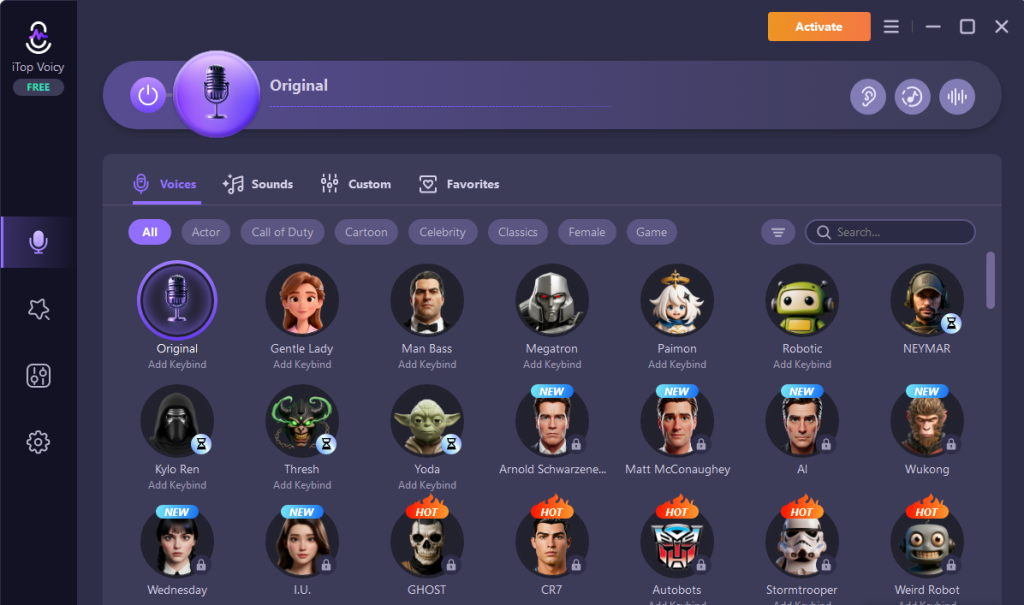
iTop Voicy has a big library of different voices you can try. Each voice has its own personality or style. Some examples include
- Robotic and futuristic
- High-pitched and cartoon-like
- Deep and dramatic
- Light and funny
It is easy to switch between voices, so you can find the perfect one for your project or just have fun experimenting.


Voice Conversion for Audio and Video Files
You don’t have to use it only for live speaking. You can also upload existing audio or video files and change the voice in them. This is great for changing narration in videos, giving characters unique voices, and making creative clips for social media.
The process is quick and easy, just a few clicks and the new voice is ready.
Built-In Recording Tool
iTop Voicy has its own recording feature. So, you do not need another program to record your voice. It also reduces background noise and echoes, making your recordings sound clear and professional. This is perfect for podcasts, storytelling, voice-overs, and video commentary.
Create Your Own Voice Models
There are also the in-built voices in addition to creating your own distinctive voices. All you have to do is to upload a voice sample and control pitch, tone, and emotions and save it. You are able to create your custom voice collection that you can use at any time.
You can build your own collection of custom voices to use anytime.


Works With Many Applications
iTop Voicy works with lots of popular programs that use microphones, like
- Voice chat apps
- Streaming software
- Video meeting tools
- Online games
Once you pick iTop Voicy as your microphone, all these programs will use the changed voice automatically.
Key Steps to Use iTOP Voicy to Turn Your Online Calls Into Fun Experience
Getting started with the software is simple and only requires a few steps. Here we have explained all the steps to make things easier for you.
1. Download and Install iTOP Voicy
Visit the official page for iTop Voicy and download the installer. After downloading it, open the installation file. Follow the setup instructions to complete the installation process.
Launch the program once installation is finished.
2. Set Up the Microphone
After opening the program, you need to go to the audio settings section. Here you can choose your microphone device from the list and speak into it to. Speaking can help you to confirm that it is working correctly.
You should see the sound meter responding when you talk to make sure everything is working fine.
3. Pick a Voice Effect
Next, open the voice library and browse the available voice styles. Click on any voice to preview it. Once you find one you like and activate the effect.
Your voice will change immediately when speaking.
4. Connect the Voice Changer to Other Apps
To use iTop Voicy in games, meetings, or other platforms, open the audio settings in those apps. Select iTop Voicy as your microphone. Save the settings.
Now, your changed voice will be heard whenever you talk in those apps. You can use its features for real time voice changing or simply record your videos in the voice you want.
Conclusion
Talking with your voice is a big part of how we connect online. iTop Voicy lets you change your voice instantly, try out different fun styles, edit voices in audio and video files, and even record your voice all in one easy program.
It is a great tool to make your online conversations and content more creative and exciting.