


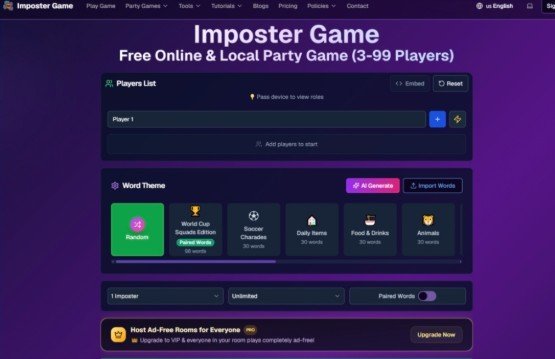
The party game market has flooded with digital adaptations over the past few years, but most of them share the same problem: they require downloads, demand accounts from every player, or simply fail to replicate the energy of a real‑life gathering. That gap between “online convenience” and “in‑person fun” has been surprisingly persistent. Then I came across imposter game – a browser‑based social deduction title that promises to handle everything from local game nights to remote multiplayer sessions with zero downloads. After running it through multiple real‑world testing scenarios across different devices and group sizes, I want to share what actually works, where it stumbles, and whether it finally bridges that awkward divide between digital tools and analog fun.
A Testing Framework Built Around Real Gatherings, Not Lab Conditions
Rather than clicking through features in isolation, I approached Imposter Game the way most groups would actually use it. Three distinct test scenarios shaped the evaluation: a local party with eight players passing a single tablet around a coffee table, a remote session with six teammates spread across three time zones, and a hybrid classroom setup where the host projected the game state on a TV while students joined on their phones. Each scenario stressed different aspects of the platform – the pass‑and‑play flow, the real‑time sync engine, and the cross‑device responsiveness. The goal wasn’t to check boxes on a feature list but to see whether the game could survive the chaos of actual human interaction without a dedicated moderator.
Two Distinct Modes That Solve Fundamentally Different Problems
The platform’s architecture hinges on a clear separation between local and online play, and that distinction proved more meaningful than I initially expected.
Local Party Mode: The Pass‑and‑Play Workflow
For in‑person gatherings, Imposter Game offers a mode that requires no login and runs entirely on a single device. The host adds player names directly on that device, selects a word theme, and sets the number of imposters along with round duration. Once the game starts, the device gets passed around – each player taps to view their role privately. Civilians see the secret word; imposters see a hint rather than the actual term. After everyone has checked their role, the group discusses face‑to‑face, gives clues, and eventually votes by raising hands to eliminate suspected imposters.
The Physical Flow Matters More Than You Think
What surprised me during testing was how naturally this pass‑and‑play rhythm fit into the existing social dynamics of a party. There was no awkward “everyone pull out your phones and install this app” moment. The single‑device approach kept attention focused on the room rather than scattered across multiple screens. The built‑in timer and voting system handled the administrative overhead that usually falls to whoever drew the short straw as moderator. For groups that already enjoy games like Werewolf or Mafia but hate the paperwork, this mode effectively removes the friction without sacrificing the face‑to‑face tension that makes those games work.
Online Multiplayer Mode: Real‑Time Sync Across Devices
Remote play tells a different story. Here, the host creates a private room and receives a six‑digit code or QR code to share with players. Each participant joins from their own device by entering their nickname. Once everyone is ready, the host starts the game, and all actions sync in real time across every screen. The game then moves through four distinct phases: a clue phase where players submit their descriptions, a discussion phase to review those clues, a voting phase to eliminate suspects, and a reveal phase that shows results and roles.
The Sync Engine Under Pressure
In my remote test with six players spread across different networks, the real‑time synchronization held up consistently. Each phase included a countdown timer, and the host retained the ability to force‑advance if a group was ready to move on. The system automatically determined winners and displayed detailed results at the end. From a practical user perspective, the experience felt closer to a dedicated board game app than a lightweight browser tool – the state updates were snappy enough that nobody felt left behind, and the role‑reveal mechanics preserved the same uncertainty that makes the local version compelling.
A Step‑by‑Step Walkthrough of the Actual Setup Process
Getting a game running requires surprisingly few steps, and the platform keeps each stage focused on what the host actually needs to do.
Step 1: Choose Your Game Mode and Room Configuration
The first decision point is selecting between local and online play. For local games, the host simply adds 3‑99 player names on the same device. For online rooms, the host creates a private room and configures the word pack, player count, and round duration. The platform supports custom word imports via .txt file uploads or direct pasting, with automatic duplicate removal and length validation. There is also a built‑in word generator tool that pulls from ten categories across five languages.
The Word Customization Options Are Surprisingly Deep
During testing, I imported a custom word list for a themed game night, and the validation process caught several duplicates and formatting issues before the game started. The platform also offers 3,600+ official words across ten diverse categories, fully localized in twelve languages including English, Chinese, Japanese, Korean, and Spanish. For groups that want to move beyond the default library, the custom import works seamlessly in both local and online modes.
Step 2: Distribute Roles and Start the Game
In local mode, this means passing the device around so each player can privately view their role. In online mode, players join via the room code or QR scan, enter their nicknames, and click ready. The host starts the game only after all participants are ready. The smart role assignment system balances distribution and manages role reveals automatically.

The Role Reveal Experience Differs Between Modes

The local pass‑and‑play approach preserves the tactile ritual of physically handing the device to each person – it slows the game down just enough to build anticipation. The online mode, by contrast, feels more like a traditional digital game where everyone sees their role simultaneously on their own screens. Both approaches work for their intended contexts, but the local mode’s deliberate pacing seemed to generate more table talk and speculation before the first clue was even given.
Step 3: Move Through the Four‑Phase Game Flow
Once roles are assigned, the game progresses through the clue, discussion, voting, and reveal phases. Civilians describe the word during the clue phase; imposters attempt to disguise their lack of knowledge. The discussion phase allows everyone to review clues before voting eliminates a suspected imposter. The system tracks game progress in real time and automatically determines the winner.
The Timer and Voting Mechanics Reduce Moderator Burden
The built‑in timer for each phase keeps games moving without requiring someone to constantly watch the clock. The voting mechanism is straightforward – players vote to eliminate suspects, and the system handles the tally. In my local tests, this automation allowed the host to participate fully rather than acting as a neutral referee, which significantly improved the overall energy of the game.
How Imposter Game Compares to Alternative Party Game Tools
| Aspect | Imposter Game | Typical Alternatives |
| Setup Time | 3 seconds for local mode, under a minute for online rooms | Often requires downloads, account creation, or per‑player installations |
| Player Capacity | 3‑99 players across both modes | Usually capped at 8‑12 players |
| Device Requirements | One device for local play; any browser for online | Often requires all players to have the same app or OS |
| Language Support | 12 fully localized languages with culturally relevant themes | Typically limited to 1‑2 languages |
| Word Customization | Import .txt files, paste directly, or use built‑in generator | May offer preset lists but rarely support custom imports |
| Moderator Tools | Built‑in timer, voting system, smart role assignment | Often requires manual tracking or external tools |
| Cross‑Device Play | Desktop, tablet, and mobile with responsive adaptation | May have inconsistent experiences across devices |
The table above reflects my hands‑on experience rather than marketing claims. The most striking differentiator was the local mode’s ability to handle large groups on a single device – something most digital party games simply don’t support. The imposter game online experience also stood out for its language localization, which includes culturally relevant themes like Chinese hotpot or Japanese anime references that actually resonate with native speakers rather than feeling like machine translations.
Where the Platform Excels and Where It Shows Its Limits
Based on real usage across multiple sessions, the strengths and weaknesses became clear through repeated testing.
Strengths That Hold Up Under Repeated Use
The cross‑device compatibility proved genuinely robust – hosting on a laptop while players joined from phones or tablets worked without any display or input lag issues. The platform’s responsiveness adapted automatically to different screen sizes, which mattered more than expected when switching between a TV projection and individual mobile views. The word library’s breadth also became apparent over multiple games; with 3,600+ official words and twelve languages, repetition didn’t become an issue even after several rounds. The custom word generator, which pulls from ten categories in five languages, offers a quick way to tailor games for specific audiences without manually building lists from scratch.
Real Limitations That Deserve Honest Mention
From a practical user perspective, the experience depends heavily on the quality of the word list being used. Generic or poorly translated words can flatten the game’s tension, and while the platform provides validation tools, it cannot guarantee that every custom import will generate balanced gameplay. The online mode requires players to log in, which adds a small barrier for spontaneous remote games. The AI clue and hint generator, which offers civilian metaphors and imposter camouflage tips for credits, is a nice extra but not essential to core gameplay. In my testing, the AI suggestions were occasionally useful but sometimes felt generic – results may vary depending on the word and context. The platform also does not offer a native mobile app, which means players must rely on browser performance, and while the responsive design handled everything I threw at it, older devices might not deliver the same smooth experience.
Who Actually Benefits Most From This Approach
The platform’s design choices make it particularly well‑suited for specific scenarios. Classroom teachers will appreciate the age‑appropriate content and the ability to project the game state on a big screen while students join from their desks. Corporate team‑building facilitators can leverage the large player capacity and custom word packs to tailor games to specific training topics. Families hosting game nights will find the local pass‑and‑play mode eliminates the “everyone on their phone” problem that plagues many digital party games. Content creators preparing TikTok or social media materials can use the word generator to quickly produce themed content. The platform is not trying to be the definitive social deduction experience for every group – but for gatherings that need a flexible, low‑friction tool that works across devices and languages, it fills a niche that most alternatives miss.
The game’s safety and inclusivity features also deserve mention. Content is reviewed for classroom and family appropriateness, with difficulty levels suitable for ages eight and up. The localized content includes native translations and culturally relevant examples, which makes the game genuinely usable for language learning contexts rather than just offering a superficial translation.

The Bottom Line From Real‑World Testing

After running Imposter Game through local parties, remote sessions, and hybrid setups, the verdict is nuanced but clear. The platform delivers on its core promise: a browser‑based social deduction game that requires no downloads and supports both in‑person and remote play. The local pass‑and‑play mode is genuinely innovative in how it preserves face‑to‑face interaction while handling administrative overhead. The online mode provides reliable real‑time sync that keeps remote groups engaged. The word customization options and language support are more extensive than most competitors offer.
That said, the experience is not flawless. The AI hint generator is a supplemental feature rather than a game‑changer. The online login requirement adds friction for spontaneous sessions. And the overall quality of gameplay still depends heavily on the thoughtfulness of the word selections and the engagement of the participants – no tool can fix a group that isn’t willing to lean into the social deduction dynamics.
For groups that want a party game tool that actually adapts to how people gather – whether that means passing a single device around a living room or coordinating a remote session across time zones – Imposter Game offers a thoughtful, well‑executed solution. It does not claim to replace every social deduction game on the market, but it does something most alternatives overlook: it meets players where they already are, on the devices they already have, without forcing them to download, register, or reconfigure their entire game night routine.