


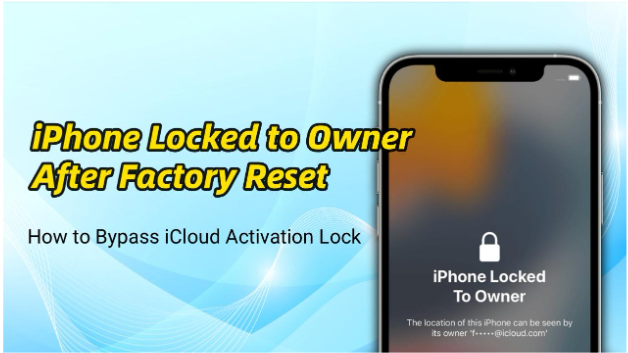
Running a factory reset is often the go-to solution for fixing iPhone issues or preparing a device for resale. But sometimes, instead of a fresh start, you’re greeted with the frustrating message: “iPhone Locked to Owner.” This happens when the device is still tied to an Apple ID through iCloud Activation Lock, preventing unauthorized access.
Whether you forgot iPhone passcode or bought a second-hand iPhone that wasn’t properly reset, this situation can leave you stuck. The good news is that there are several ways to bypass iCloud Activation Lock after a factory reset. In this guide, you’ll learn practical methods and effective iPhone unlocker tools to regain access to your device.
Why Is Your iPhone Locked to Owner After Factory Reset?
iPhone “Locked to Owner” screen appears because of Apple’s security feature linked to Find My iPhone. When this feature is enabled, the device becomes associated with the owner’s Apple ID.
Even after a factory reset, the iPhone will still require the original Apple ID and password to activate. This prevents stolen or lost devices from being reused without permission.
Common reasons include:
- The device was reset without signing out of iCloud
- “Find My iPhone” was still enabled before resetting
- You purchased a used iPhone that’s still linked to the previous owner
- You forgot your Apple ID credentials
Understanding the cause helps you choose the most suitable solution below.
Method 1: Bypass iCloud Activation Lock with Passcode
In some cases, Apple allows you to bypass Activation Lock using your device passcode instead of the Apple ID password.
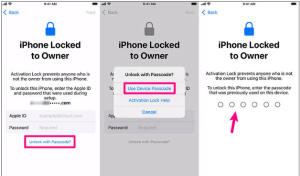
This option appears as “Unlock with Passcode” on the Activation Lock screen.
Steps:
- On the Activation Lock screen, tap Unlock with Passcode
- Tap Use Device Passcode and enter the iPhone’s previous screen passcode
- Follow the on-screen instructions to continue setup
Requirements:
- The device must have had a passcode set previously
- Two-factor authentication may need to be enabled
- This option is only available under certain conditions (e.g., recently changed Apple ID password)
If available, this is one of the quickest and easiest ways to regain access.

Method 2: Remove iCloud Activation Lock with a Professional Unlocking Tool
If you don’t have access to the original Apple ID, a reliable solution is using a professional tool like TunesKit iPhone Unlocker. This tool is designed to remove various iPhone locks, including iCloud Activation Lock, without requiring the original credentials.
Why choose TunesKit iPhone Unlocker?
- Remove iCloud Activation Lock without Apple ID
- Unlock screen passcodes, Face ID, and Touch ID
- Supports the latest iOS versions and most iPhone models
- Bypass Screen Time passcode and remove MDM from iPhone
- Easy-to-use interface with step-by-step instructions
Steps:
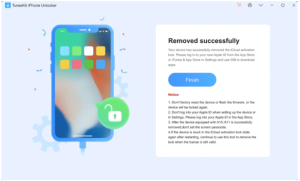
1. Download and install TunesKit iPhone Unlocker on your computer. Launch the program and connect your iPhone.
2. Select Remove iCloud Activation Lock. Click Start and follow instructions to enter DFU mode. Once done, the device will begin jailbreak process.
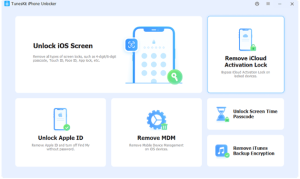

3. Click Start Remove, TunesKit will prompt you to repeat enter DFU mode steps and begin the removal process.
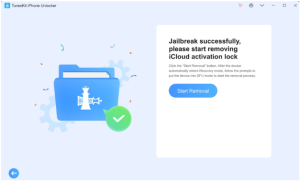

4. Wait for completion and set up your device as new.

Method 3: Reset Apple ID Password via iforgot.apple.com
If you simply forgot your Apple ID password, resetting it is the safest and most official solution. It’s worth noting that you must have access to your trusted phone number or email address to complete the verification process. If the verification is unsuccessful, you may need to start account recovery, which can take several days to complete.
Steps:
- Visit the iforgot.apple.com page using any browser
- Enter your Apple ID email address. Choose a verification method (SMS, email, or security questions)
- Create a new password
- Return to your iPhone and sign in with the updated credentials
Once reset, you can remove the Activation Lock normally.
Method 4: Ask the Previous Owner to Remove the Device Remotely
If your iPhone was purchased second-hand, the previous owner can remove the Activation Lock remotely via iCloud.
Steps for the previous owner:
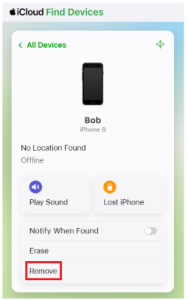
- Sign in to iCloud.com with the Apple ID account and password linked to the locked iPhone
- Go to Find My and select All Devices
- Choose the locked iPhone and click Remove. Confirm the action
- After removal, restart the locked iPhone and proceed with setup. The Activation lock should no longer appear.
This is one of the most effective and completely free solutions.

Method 5: Contact Apple Support for Assistance
If you are the legitimate owner but cannot access your Apple ID, Apple Support may help remove the Activation Lock.
What you need:
- Proof of purchase (receipt or invoice)
- Device IMEI or serial number
- Valid identification
Steps:
- Visit Apple’s official support page or an Apple Store
- Submit a request for Activation Lock removal
- Provide all required documentation
- Wait for verification
Apple will only unlock devices for verified owners, so this method is not suitable for devices without proper ownership proof.
FAQs About iPhone Locked to Owner After Factory Reset
- Can I remove Activation Lock without an Apple ID?
Yes, it is possible by using professional tools like TunesKit iPhone Unlocker. But results may vary depending on the device model and iOS version. - Is bypassing Activation Lock legal?
Bypassing Activation Lock is only legal if you are the legitimate owner of the device. Attempting to unlock a lost or stolen iPhone without permission may violate local laws and Apple’s terms of service. - Does “Unlock with Passcode” always appear?
No, it only shows under specific conditions set by Apple, such as when the device recently had a passcode enabled or certain security settings are active. It is not guaranteed to be available on all devices or iOS versions.
Conclusion
iPhone Locked to Owner after a factory reset can feel like hitting a wall, but there are multiple ways forward. Whether you reset your Apple ID password, use the Unlock with Passcode option, contact the previous owner, or rely on tools like TunesKit iPhone Unlocker, the right solution depends on your situation.
To avoid this issue in the future, always sign out of iCloud before resetting or selling a device and verify ownership when buying second-hand. With the right approach, you can regain access and get your iPhone working again without unnecessary stress.