


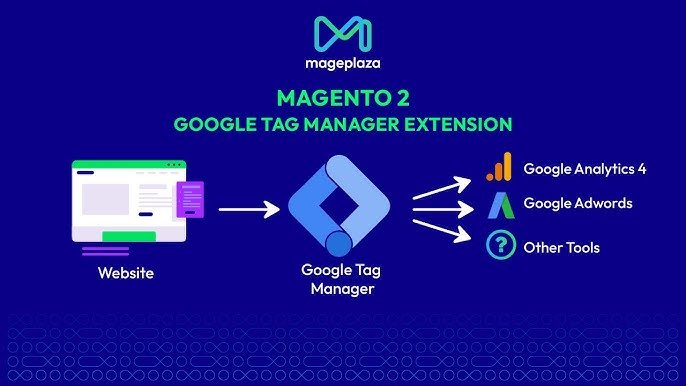
Running a Magento 2 store without proper tracking is like driving with your eyes closed. You are making product, pricing, and marketing decisions without knowing what your customers actually do on your site. Google Tag Manager (GTM) changes that entirely. It gives you a centralized, code-free way to track every meaningful customer interaction and feed that data straight into Google Analytics 4 (GA4) and other tools you already use.
This article explains what Google Tag Manager is, why it matters for Magento 2 stores specifically, and how combining it with the right navigation tools creates a store that is both smarter and faster to shop.
Key Takeaways
- Google Tag Manager lets you manage all tracking scripts in one place without editing your Magento theme files.
- The Amasty Magento 2 GTM extension automates the entire GA4 integration, including a one-click JSON export that sets up all ecommerce tags instantly.
- AJAX layered navigation removes page reload friction from product filtering, directly improving the shopping experience and conversion rates.
- Amasty’s Improved Layered Navigation is installed on over 14,600 active Magento stores and includes multi-select filtering, SEO-friendly URLs, and full AJAX support.
- Using GTM tracking alongside better navigation creates a feedback loop: you can see which filtering behaviors lead to purchases and optimize accordingly.
- Amasty has over 15 years of active Magento extension development, with regular compatibility updates and detailed documentation.
What Is Google Tag Manager, and Why Does It Matter for Magento 2?
Google Tag Manager is a free tag management platform from Google. In simple terms, it lets you add and manage tracking codes (called “tags”) on your website without editing your theme files every time. Instead of asking a developer to add code whenever you want to track a new event, you manage everything from a single GTM dashboard.
For a Magento 2 store, this means you can track actions like:
- Product page views
- Add-to-cart events
- Checkout steps completed
- Purchases and order values
- Promotions clicked
- Search terms used on site
Without GTM, tracking each of these events would require separate code changes to your Magento theme. With GTM, you manage them all from one interface, and updates go live without a deployment.
According to a 2024 analysis by the Baymard Institute, stores that actively track and optimize the customer journey see significantly higher conversion rates compared to stores that rely on default platform analytics alone. Data-driven decisions start with reliable data collection, and GTM is how most serious Magento merchants collect it.
How the Magento 2 Google Tag Manager Extension by Amasty Works
For Magento 2 store owners, the most practical way to implement GTM correctly is through a purpose-built extension. Amasty, a well-established name in the Magento ecosystem with over a decade of extension development experience, offers a magento 2 google tag manager extension that handles the entire integration without requiring manual code changes.
Here is how the setup works in practice:
- You install the Amasty GA4 with GTM Support extension from your Magento backend.
- You enter your GTM Container ID, which connects your store to your GTM account.
- The extension automatically adds the GTM tracking code across every page of your store.
- With a single click, you generate and download a JSON file containing all pre-configured tags, triggers, and variables for GA4 ecommerce tracking.
- You import that JSON file into GTM, and your entire ecommerce event tracking is live.
This process eliminates the most error-prone part of a manual GTM setup, which is creating dozens of tags and variables from scratch. A misconfigured tag can silently fail for weeks before someone notices the data gap. A pre-built JSON file built specifically around Magento’s data layer removes that risk.
Key Features of the Amasty GTM Extension
- Automatic GTM code injection across all store pages (no theme edits required)
- GA4 data layer populated with all standard ecommerce events out of the box
- Pre-built event tracking for: view_item, select_item, add_to_cart, begin_checkout, purchase, and more
- Brand-level tracking to understand which brands drive the most engagement
- Debug mode popup that displays browser events directly on the storefront in real time, so you can verify tracking without switching tools
- Server-side tagging support for GDPR-compliant data handling
- Google Ads conversion tracking and remarketing tag support
- Consent Mode v2 compatibility for privacy-first markets
- One-click JSON export and import for fast GTM setup
The practical result: store owners get a complete, accurate picture of customer behavior from first visit through purchase, without writing a single line of code.
Real-World Impact of Proper GTM Implementation
A store that tracks ecommerce events correctly can answer questions like:
- Which traffic sources produce the highest revenue per visit?
- At which checkout step do most customers drop off?
- Which product categories get the most views but the fewest purchases?
- Are my promotional banners actually driving clicks?
These are not abstract analytical questions. They are the inputs behind decisions on ad spend, product placement, and checkout flow improvements. Stores that cannot answer them are spending marketing budget without meaningful feedback on what is working.
Why Smart Navigation Is Just as Important as Smart Tracking
Tracking tells you what is happening. Navigation determines whether customers can find what they want in the first place. These two things work together.
A common problem with default Magento 2 navigation is that every time a customer applies a filter, the page reloads. For a shopper narrowing down a category by size, color, and price range, that means three separate page loads just to see the filtered results. Each reload is friction. Friction costs sales.
This is where magento 2 ajax layered navigation from Amasty addresses a critical gap in the default Magento experience.
What AJAX Layered Navigation Does
AJAX (Asynchronous JavaScript and XML) is a technology that allows web pages to update their content without a full reload. When applied to product filtering, it means customers can select multiple filters in sequence and see results update instantly, without the page refreshing each time.
The Amasty Improved Layered Navigation extension is installed on over 14,600 active Magento stores, making it one of the most widely adopted navigation extensions in the Magento ecosystem. That adoption reflects a straightforward reason: it works, and customers notice the difference.
Key features of the Amasty AJAX layered navigation include:
- Instant filter results with no page reload
- Multi-select filtering so customers can choose multiple values in one filter (for example, multiple colors at once)
- Price sliders and from/to widgets for numeric attributes
- Vertical and horizontal navigation layout options
- 5 display modes for filter values: labels, images, images and labels, text swatches, and more
- Custom “On Sale,” “New,” “Rating,” and “In Stock” filters built in
- SEO-friendly URLs for filtered category pages
- Compatible with Hyva themes and GraphQL
- Search box inside filter blocks for catalogs with many attribute values
- Tooltip support for product attribute information
The Sales Impact
Amasty has shared data from their customer base showing that stores implementing their Layered Navigation typically see around a 2.3x increase in sales within three months. This figure aligns with general e-commerce research on navigation optimization: when customers can find what they want quickly, conversion rates improve.
According to the Baymard Institute, 84% of e-commerce websites offer poor filtering and navigation experiences. That is not a small problem. It is a widespread gap that directly drives abandonment. Customers who cannot filter to their specific needs within a few seconds leave and look elsewhere.
An AJAX-powered filtering system reduces that friction at the most practical level: the moment a shopper is trying to find a product.
Connecting the Dots: GTM Tracking Meets Better Navigation
Here is where these two tools reinforce each other.
When you implement the Amasty GTM extension alongside the Amasty AJAX Layered Navigation, you get something more valuable than either tool provides alone: trackable, smooth product discovery.
With GTM tracking active, you can measure:
- Which filters customers apply most often before adding a product to cart
- How many filter interactions it takes on average before a purchase event fires
- Whether customers who use AJAX filters convert at a higher rate than those who browse without filtering
This data tells you which attributes matter most to your customers. That insight feeds back into how you merchandise categories, which filters you prioritize in your navigation layout, and which product attributes you invest time in keeping accurate and complete.
Better navigation generates better customer behavior. Better tracking tells you which navigation improvements are actually working.
Why Amasty Is a Trusted Name in Magento Development
Amasty has been building Magento extensions since 2009. Their catalog covers over 150 extensions across marketing, SEO, customer experience, checkout, and store management. They maintain compatibility updates with each major Magento release and provide detailed documentation for every product.
Their GTM extension received a version 3.0 refactor in August 2025 with full PHP 8.1+ support, and the June 2025 release added multishipping checkout compatibility. Their Improved Layered Navigation is regularly updated, with recent releases adding Magento 2.4.8 compatibility and WCAG accessibility compliance.
For store owners making long-term platform decisions, extension reliability and active maintenance matter as much as the feature list. Extensions that fall behind on compatibility create technical debt that eventually requires significant time to resolve.
Amasty’s track record across both of these products is consistent with what you would expect from a company that has been core to the Magento extension ecosystem for over 15 years.
Frequently Asked Questions
What is Google Tag Manager and do I need it for my Magento 2 store?
Google Tag Manager is a free tool that lets you add and manage tracking codes on your website from a central dashboard. For a Magento 2 store, it is the most practical way to implement GA4 ecommerce tracking, conversion tracking, remarketing, and other analytics without requiring developer involvement for every change. If you run any paid advertising or want to understand customer behavior beyond basic page views, you need it.
Is the Amasty GTM extension difficult to set up?
No. The setup involves entering your GTM Container ID in the extension settings, then using the one-click JSON export feature to generate a file containing all your pre-configured tags, triggers, and variables. You import that file into Google Tag Manager, and your GA4 ecommerce tracking is live. Amasty also provides a debug mode that shows you browser events in real time on the storefront, so you can verify everything is working without needing to check GTM separately.
What is AJAX layered navigation and how is it different from default Magento filtering?
Default Magento 2 filtering reloads the entire page every time a customer applies or changes a filter. AJAX layered navigation updates the product list instantly without a page reload. For a customer filtering by multiple attributes (color, size, price range), this removes three separate load screens from their experience. The result is faster, smoother browsing that keeps shoppers engaged rather than waiting.
Can I use both the GTM extension and the AJAX layered navigation extension together?
Yes. Both are Amasty extensions built for Magento 2 and are compatible with each other. Running both gives you a store where customers can filter products quickly and all their interactions are tracked accurately in GA4.
Do I need a developer to install these extensions?
Basic installation follows standard Magento extension procedures (Composer or manual upload). The configuration for both extensions is handled through the Magento admin panel with no custom coding required. If you have no prior Magento admin experience, Amasty provides detailed documentation and support for both products.