


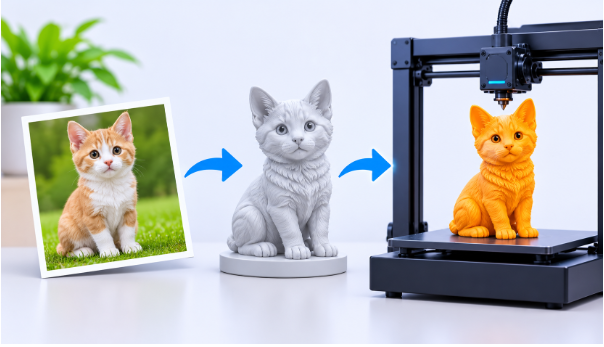
Creating realistic 3D objects has become easier with the development of artificial intelligence. In the past, designers needed advanced technical knowledge and professional modeling software to transform creative ideas into three-dimensional objects. Today, AI-powered solutions are changing this process by making 3D design more accessible to beginners, artists, developers, and businesses.
A modern 3D model maker allows users to create detailed three-dimensional objects with less manual effort. Whether someone wants to develop a product prototype, design a digital character, or prepare an object for 3D printing, AI-assisted modeling can help simplify the creative workflow.
Another important development is the ability to convert ordinary pictures into three-dimensional models. This technology creates new opportunities for people who want to transform their visual ideas into usable digital assets without building every shape manually.
What Is an AI 3D Model Maker?
An AI 3D model maker is a digital tool that uses artificial intelligence to generate three-dimensional objects from supported inputs, such as reference images or text descriptions. Instead of manually constructing every surface and component, users can provide visual or written instructions and let the AI system generate an initial model.
Traditional 3D modeling involves several technical processes, including mesh creation, sculpting, texturing, and geometry adjustments. These activities can require considerable experience, especially when working with complex objects.
AI-powered modeling reduces some of these difficulties by automating parts of the creation process. Users can focus more on their creative ideas while the software handles much of the initial model generation.
For example, someone designing a decorative vase can start with a reference image and generate a three-dimensional representation. The resulting model can then be reviewed, refined, and prepared for a suitable digital or physical application.
How AI Makes 3D Modeling Easier
Artificial intelligence introduces several useful improvements to the traditional modeling workflow.
1. Faster Model Creation
Building a detailed object manually can take hours or even days, depending on its complexity. AI-assisted generation can significantly reduce the time needed to produce an initial model.
This allows designers to explore multiple concepts and compare different shapes before deciding which direction to develop further.
2. More Accessible Design Tools
Beginners often find traditional modeling applications difficult because they require knowledge of technical controls and modeling techniques.
AI tools provide a simpler starting point. Users can experiment with image-based or text-based generation without first mastering every aspect of professional 3D software.
3. Better Creative Experimentation
Designers can test different proportions, shapes, and visual styles during the early stages of a project. This makes it easier to explore creative possibilities and develop new product concepts.
4. Support for Different Industries
AI-generated 3D assets can be useful in product design, gaming, animation, education, architecture, digital art, and manufacturing. Different industries can adapt these models to their individual requirements.
Understanding 2D Image to 3D Model Technology
One of the most interesting developments in AI modeling is the ability to transform a flat picture into a three-dimensional object.
The 2D image to 3D model process uses artificial intelligence to analyze an image and estimate the object’s shape, depth, structure, and surface details. Based on this information, the system generates a digital representation that can be viewed from different angles.
For example, imagine having a photograph of a small decorative statue. Instead of recreating the entire object manually, an AI-powered image-to-3D tool can analyze the reference image and generate a corresponding three-dimensional model.
This approach can save time and provide a useful starting point for further editing.
How Does Image-to-3D Conversion Work?
Although the exact process varies between platforms, the general workflow includes several stages.
Step 1: Upload a Reference Image
Start by selecting a clear photograph, illustration, or supported image of the object you want to convert. Images with visible shapes and well-defined boundaries can provide useful visual information.
Step 2: AI Image Analysis
The AI system examines the reference image to identify important visual characteristics, including object boundaries, proportions, depth information, and surface details.
Step 3: Three-Dimensional Reconstruction
Using the analyzed information, the system estimates the object’s three-dimensional structure and generates a digital mesh.
Step 4: Texture Generation
Depending on the available features, the software may also generate or apply textures to improve the model’s visual appearance.
Step 5: Preview and Export
Finally, users can inspect the generated object and export it in a supported file format for further editing, visualization, or 3D printing.
Why Convert 2D Images into 3D Models?
Image-to-3D conversion offers several practical advantages for different types of creators.
- Saves development time: Users can generate an initial model without constructing every component manually.
- Improves visualization: A flat reference image becomes a three-dimensional object that can be viewed from multiple angles.
- Supports product development: Designers can use generated assets to explore product concepts and prepare early prototypes.
- Encourages creativity: Artists can experiment with turning illustrations, photographs, and design references into digital objects.
- Simplifies learning: Beginners can explore 3D design through a more approachable creation process.
How to Choose the Right AI 3D Modeling Tool
Not every AI modeling platform provides the same features. Before selecting a tool, consider the following factors.
Image and Text Input Options
Look for a platform that supports the type of input you prefer. Some tools focus on image-based generation, while others provide additional text-based creation options.
Model Quality
Geometry, proportions, and surface details are important when creating useful 3D assets. A good tool should produce models that can be inspected and refined after generation.
Export Formats
Check whether the platform supports commonly used formats such as STL, OBJ, GLB, FBX, or 3MF. The right format depends on whether you plan to use the model for printing, animation, visualization, or further editing.
Additional Editing Features
Some projects require more than basic model generation. Features such as AI texturing, model splitting, and multicolor preparation can make the overall workflow more convenient.
Exploring 2D Image to 3D Model Creation with AI
For creators who want to transform pictures into digital objects, an online 2D image to 3D model solution can provide a convenient starting point.
Instead of spending significant time building geometry from scratch, users can upload a suitable reference image and allow the AI system to generate an initial three-dimensional representation.
This approach can be particularly useful for artists creating collectible figures, designers developing product concepts, and hobbyists experimenting with customized objects.
However, generated models should always be inspected before professional use. A single image cannot show every side of an object, so the AI may need to estimate hidden surfaces and structural details. When accuracy is important, additional reference views and manual adjustments can help improve the final result.
Practical Applications of AI-Generated 3D Models
AI-powered modeling is becoming useful in several creative and professional environments.
3D Printing: Hobbyists and makers can create digital models of decorative objects, miniatures, accessories, and prototypes before preparing them for printing.
Game Development: Developers can use AI-generated assets as starting points for characters, props, and environmental objects. These assets may require additional optimization before being added to a game.
Product Design: Businesses can explore early product concepts and visualize different design directions without manually constructing every initial model.
Education: Students can use image-to-3D workflows to understand digital geometry, object structure, and creative technology.
Digital Art: Artists can transform illustrations and visual references into three-dimensional assets for further creative development.
Tips for Getting Better AI 3D Modeling Results
The quality of the reference material and the amount of post-generation refinement can influence the final outcome.
Here are some practical suggestions:
- Use clear reference images with good lighting.
- Choose images where the main object is easy to distinguish from the background.
- Avoid heavily blurred or distorted references.
- Use multiple consistent views when the platform supports multi-view generation.
- Inspect the generated model from different angles.
- Review geometry and textures before exporting.
- Check dimensions, wall thickness, and mesh integrity before 3D printing.
Following these practices can help users obtain more useful results and reduce the need for extensive corrections.
Final Thoughts
AI-powered 3D modeling is making digital design more accessible by reducing the technical effort involved in creating three-dimensional objects. A modern 3D model maker can help beginners and experienced designers generate initial models, explore creative concepts, and develop digital assets more efficiently.
At the same time, 2D image-to-3D technology offers an exciting way to transform ordinary pictures into three-dimensional creations. From product visualization and digital art to gaming and 3D printing, these technologies provide new opportunities for creative experimentation.
As AI tools continue to improve, combining automated model generation with careful editing and preparation can help creators develop better digital assets and bring more of their ideas into the real world.