


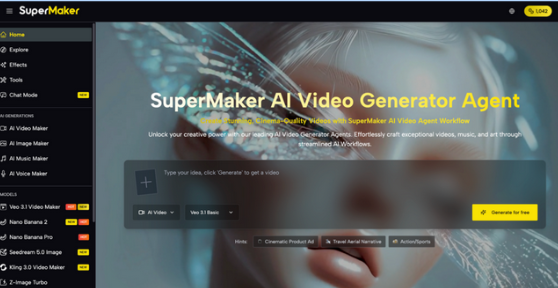
Minecraft has over 140 million monthly active players and every one of them wants to stand out. Yet designing a custom skin traditionally means mastering pixel art editors, wrestling with 64×64 grids, and spending hours on details most players don’t have time for.
An AI Minecraft Skin Generator changes all of that, letting anyone transform a photo or idea into a fully game-ready skin in seconds, no artistic background required.
The Real Pain Points of Traditional Minecraft Skin Design
Creating a Minecraft skin the old-fashioned way comes with a frustrating set of barriers:
- Technical complexity: Pixel art tools like editing a 64×64 sprite map require precision that takes months to learn
- Time investment: Crafting a detailed skin by hand can take hours even for experienced designers
- Inconsistent results: Manual attempts often produce skins that look great in the editor but awkward in-game
- Limited creativity: Most free skin templates are overused and generic, making it impossible to truly stand out on multiplayer servers
- Compatibility confusion: Different Minecraft editions (Java, Bedrock, Pocket) have different format requirements that trip up beginners
For gamers, streamers, educators, and brand creators alike, these friction points kill momentum before the creative process even begins. That’s exactly why AI-powered tools are transforming how skins get made.
Core Features of SuperMaker AI Minecraft Skin Generator
SuperMaker AI Minecraft Skin Generator is purpose-built to eliminate every one of those pain points. It runs on advanced generative AI models that understand visual style, reference images, and creative intent producing high-quality, one-of-a-kind skins in moments.
AI-Powered Skin Generation from Any Image
The core feature is straightforward but powerful: upload any reference image a photo of yourself, a character concept, a historical figure, an animal and the AI instantly generates a matching Minecraft skin. The model analyzes your image for style, colors, and visual identity, then translates that into a pixel-perfect skin. No design experience is needed at any step.
Full Customization & Infinite Revisions
Unlike static skin packs or template editors, SuperMaker gives you complete creative freedom. Adjust colors, swap patterns, add accessories, and preview changes in real time. If the first result isn’t quite right, regenerate as many times as you like there’s no cap on revisions. The platform supports a wide range of themes including fantasy, cyberpunk, historical, modern, and animal-inspired styles.
Universal Compatibility & Instant Download
Every skin generated is compatible with all Minecraft editions Java, Bedrock, and Pocket Edition. Once you’re happy with the result, download the PNG file and apply it directly through the official Minecraft website or your game launcher. The process from generation to in-game appearance takes under five minutes.
How to Create Your Minecraft Skin
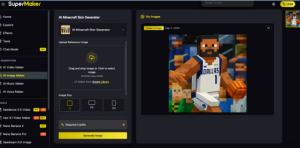
Step 1: Upload Your Reference Image
Choose a clear, well-lit photo or any image that represents the style or character you want. Upload it to the SuperMaker AI Minecraft Skin Generator as your visual reference.
Step 2: Select Output Size & Generate
- Set your preferred image output size based on your Minecraft edition requirements
- Click “Generate Image” the AI processes your reference and produces a custom skin within seconds
- Preview the result directly on the platform before downloading
Step 3: Refine, Download & Apply
- Regenerate or fine-tune colors and patterns until you’re fully satisfied
- Download the PNG skin file compatible with all Minecraft versions
- Upload to your Minecraft account via the official website or game launcher
- Launch the game and show off your new look on any server

How SuperMaker Compares to Other Minecraft Skin Tools
| Tool | Core Strength | Best For | Free Tier |
| SuperMaker AI | AI generation from reference image + infinite revisions | All creators, zero design skills needed | Free trial available |
| Skindex | Large community skin library | Browsing existing skins | Free |
| MinecraftSkins.com | Simple template customization | Basic edits | Free |
| Nova Skin | Manual pixel art editor | Experienced designers | Free |
| SkinMC | Skin preview tools | Reviewing existing skins | Free |
The key differentiator is clear: while most tools require manual effort or limit you to pre-made templates, SuperMaker AI generates a completely unique skin from your own image, with no artistic skill required and no revision limits.
Frequently Asked Questions About AI Minecraft Skin Generator
Do I need design experience to use the AI Minecraft Skin Generator?
Not at all. SuperMaker AI handles the entire design process automatically. You only need to upload a reference image the AI does the rest, from style interpretation to pixel-perfect rendering.
What Minecraft editions are supported?
All skins generated by SuperMaker are fully compatible with Java Edition, Bedrock Edition, and Pocket Edition, so there’s no format mismatch regardless of how you play.
Can I use a photo of myself as the reference image?
Yes. You can upload any image a selfie, a character illustration, a pet photo, or a logo and the AI will generate a Minecraft skin that reflects that visual identity.
How many skins can I generate?
There are no limits on regenerations. You can create and revise as many times as needed until you get the result you want.
Is there a free option?
Yes. SuperMaker offers a free trial so you can explore the AI Minecraft Skin Generator before committing to a premium plan.
Conclusion
Whether you’re a competitive multiplayer player, a content creator building a recognizable brand, or a teacher running creative classroom projects, your Minecraft skin is your visual identity in-game. Don’t settle for a generic look when AI can craft something uniquely yours in seconds.
If you’ve been putting off creating a custom skin because it seemed too technical or time-consuming, SuperMaker AI has removed every excuse. Try the AI Minecraft Skin Generator for free upload your first image today and see your new skin come to life.