


Music-led content often begins with feeling before it becomes a finished edit. A beat, a tempo shift, a hook, or a rough voice note can suggest the shape of a video long before the final footage exists.
For creators who work around tracks, podcasts, short-form clips, tutorials, or brand campaigns, that early stage is usually messy. Someone has a visual idea. Someone else has a sound reference. A third person wants the clip to feel faster, warmer, sharper, or more cinematic. The problem is not a lack of ideas. The problem is getting those ideas into a form that can be reviewed.
That is where Seedance 2.5 becomes interesting for music and media creators. The model is not only about typing a prompt and waiting for a polished clip. Used carefully, it can help turn a written direction, visual references, and audio cues into a first video draft that shows whether the rhythm of an idea actually works.

Why Audio Cues Matter Before Editing Begins
A finished video may depend on editing software, color correction, captions, and sound design. But the earliest question is often simpler: does the motion match the mood?
A creator might want a product reveal to land on a beat. A music blogger may need a short visual intro for an article about a new sound. A tutorial creator may want background motion that supports the pacing of a spoken explanation without distracting from the message. A small brand may want to test whether a calm acoustic tone or a faster electronic rhythm better suits a campaign.
Those decisions are hard to settle with a static mood board. Images can show style, but they do not show timing. A script can describe a beat, but it does not show whether the scene feels too slow or too crowded. A rough video draft gives teams something closer to the real question: does this idea move in the right way?
From Sound Reference to Video Brief
The useful workflow starts before generation. Instead of asking for a vague music video or a generic visualizer, creators should prepare a short brief:
- What is the main idea of the clip?
- What mood should the first three seconds create?
- Which visual elements must stay consistent?
- What kind of movement should match the beat or spoken rhythm?
- Which details should be added later in editing rather than generated inside the scene?
This matters because audio can guide pacing, but it should not carry the whole creative direction. A beat reference may suggest energy, cuts, or camera movement. It does not automatically define the product, setting, color palette, or message. Those still need to be written clearly and supported with approved images, clips, or brand assets.
Audio references can help communicate mood, energy, and general pacing, but they should not be treated as a guarantee of frame-accurate beat synchronization. Precise cuts and timing may still need to be completed in editing software.
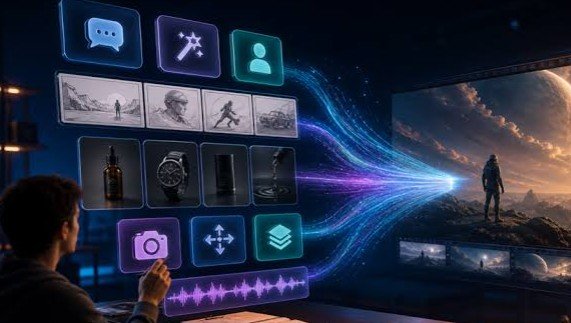
On XMK, Seedance 2.5 supports up to 50 multimodal reference files, including images, videos, and audio. That makes it useful when a creator already has several approved materials: a cover image, a logo-free background, a color reference, a movement sample, and a short audio cue. The goal is not to upload everything available. The goal is to give each reference a job.
What Makes a Music-Led Draft Useful
A good draft does not need to look like the final export. It needs to answer practical questions. Does the opening feel immediate enough? Does the main visual idea stay clear? Does the movement support the rhythm, or does it fight against it? Can the draft be understood without relying on generated text inside the frame?
For music-adjacent content, the timing question is especially important. A clip that looks impressive in a still frame may feel flat once it moves. A scene with too much motion can bury the message. A slow camera move may fit a reflective track but weaken a punchy teaser. These are the kinds of choices that are easier to discuss when the team has a moving draft rather than a paragraph of opinions.
Seedance 2.5 on XMK can fit this middle stage: after the idea is written, but before a creator commits to a full edit, shoot, or campaign asset. Its longer generation window gives enough room to test a beginning, development, and ending in one pass, while reference inputs help keep the draft closer to the intended style.
Rights and Attribution Still Come First
Music, voice recordings, previous campaign clips, and podcast audio should only be used when the team has permission for external AI processing and the intended promotional use. Access to a file does not automatically include synchronization rights, derivative-use rights, voice rights, or the right to upload it to an AI service.
Creators should also avoid real human faces, celebrity likenesses, copyrighted characters, unreleased client material, and any reference that the platform does not support. If the goal is to make a teaser for a song, episode, or brand campaign, it is usually safer to use original artwork, licensed visuals, abstract motion, product-only imagery, or non-identifiable scene references.
Generated audio or narration should not imitate an identifiable artist, host, guest, or performer without proper authority and platform support. A draft can suggest mood and pacing, but it should not pretend to be an official performance, interview, concert clip, or documentary record.
A Simple 30-Second Planning Structure
Not every draft needs the full available duration, but a 20- to 30-second structure can help creators test whether an idea has enough shape:
- 0-4 seconds: establish the mood or central visual cue.
- 4-12 seconds: introduce the main object, topic, or creative idea.
- 12-22 seconds: let the motion develop with the rhythm or narration.
- 22-30 seconds: close on a simple visual beat that can support a title, caption, or call to action added later.
This is only a planning template. A fast social teaser may need less time. A tutorial intro may need slower pacing. A music feature may need a more atmospheric build. The point is to review the structure before spending time polishing the wrong direction.

Where Local Refinement Helps
In the XMK Seedance 2.5 workflow, local re-draw is presented as an option for targeted refinement. A draft may have the right pacing but the wrong object, background, or visual emphasis. In that case, local re-draw can help adjust a specific element instead of restarting the entire clip.
That does not remove the need for review. After every change, the full clip should be checked again for consistency, rights, factual accuracy, and visual meaning. A small edit can still change the tone of the whole piece, especially when music or spoken rhythm is involved.
Final Thoughts
For creators who think in beats, hooks, and mood before they think in final edits, AI video is becoming more useful as a planning tool. The strongest use is not replacing the editor, designer, producer, or sound specialist. It is giving them a moving draft that makes creative discussions more concrete.
Seedance 2.5 is useful in that context because it supports longer drafts, multimodal references, and targeted changes. For music-led content, that means a team can test pacing, rhythm, and visual direction earlier, then bring human judgment back in before publishing anything final.

