


Options for microphones, mobile rigs, loaner gear, maintenance, and bookings
Recording studios manage more than a static inventory. Microphones move between rooms, mobile rigs leave the building, cables disappear into session bags, and accessories return separately from the gear they support. A useful management tool must handle movement without interrupting the creative work.
The strongest choice depends on the studio’s operating model. An internal production team needs fast custody tracking. A university equipment cage may need reservations and approvals. A rental operation needs client, quote, and job workflows. This list ranks nine options for different studio environments.
Quick ranking
- WhoHasGear — best overall for simple internal gear checkout
- Cheqroom — best for reservations and managed equipment rooms
- Sortly — best for visual inventory and mixed supplies
- AssetTiger — best for a conventional asset register

- Snipe-IT — best for studio computers and technical hardware
- Airtable — best for building a custom production database
- Current RMS — best for rental-oriented operations
- Google Sheets — best for a basic inventory baseline
- Shared booking calendar — best for room and session scheduling


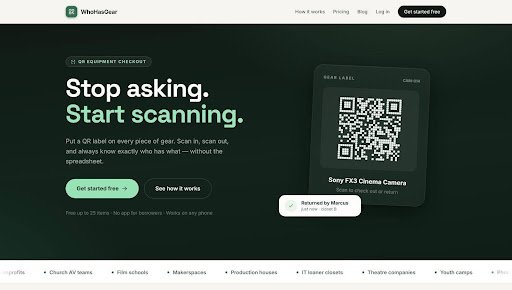
1. WhoHasGear — Best overall for internal studio checkout
WhoHasGear is the top choice for studios that want to track shared equipment without turning every handoff into an administrative task. A QR code can connect a case, recorder, microphone kit, camera, laptop, or lighting package to its checkout record. Engineers and producers can update custody where the gear actually moves.
This approach fits project studios, podcast networks, church production teams, music departments, rehearsal facilities, and small media companies. It is particularly useful when different people borrow equipment but the organization is not operating a full commercial rental desk.
Studios should label kits thoughtfully. The case is often a safer and more visible surface than the microphone or device itself. A short contents list can help the return process verify clips, cables, batteries, mounts, power supplies, and adapters rather than confirming only the highest-value item.
2. Cheqroom — Best for reservations and equipment rooms
Cheqroom is built around equipment bookings, checkouts, returns, and availability. It supports barcode and QR scanning, reservations, kits, reminders, condition-related workflows, and a calendar-oriented view of gear use.
That makes it a strong option for larger studios, universities, media programs, and production departments with a staffed equipment cage. Advance booking is important when several crews need the same wireless package, camera body, lens set, or location recorder.
The system may be more than a small studio needs. Setup should include clear categories, user permissions, reservation rules, and kit structures. The value comes from using those operational controls, not simply importing a list of microphones.
3. Sortly — Best for visual inventory
Sortly emphasizes photos, folders, tags, custom fields, barcode or QR labels, and mobile inventory work. That visual structure can be helpful in studios where users recognize a case or accessory more quickly than its asset number.
It also works well for mixed collections. A studio might track microphones, stands, cables, décor, office devices, camera accessories, consumable media, and spare parts in one organized account.
Studios with complex booking requirements should test the reservation experience carefully. Sortly’s strength is accessible inventory organization. A facility that schedules many overlapping productions may prefer a platform where availability planning is the central workflow.
4. AssetTiger — Best for a conventional asset register
AssetTiger is oriented toward asset records, assignments, maintenance, and related administrative information. It can suit studios that want a structured register for purchases, serial numbers, warranties, locations, and responsible users.
This is useful for insurance preparation and lifecycle management. A studio needs to know not only where an item is today, but also what it cost, when it entered service, and whether recurring problems justify replacement.
The operational test is checkout speed. A detailed asset record is valuable, but engineers will bypass it if routine handoffs require too many steps. Keep administrative fields separate from the action used during a busy session.
5. Snipe-IT — Best for computers and technical hardware
Snipe-IT is an open-source asset management platform commonly used for IT equipment. It supports assignments, asset models, status labels, accessories, components, and history.
For studios, it is most relevant to computers, monitors, interfaces, tablets, mobile devices, network hardware, and long-term employee assignments. Technical teams that can self-host may appreciate the control and extensibility.
It is not automatically a polished self-service system for microphones and production kits. The studio should determine whether its technical staff can maintain the deployment and whether the checkout experience fits creative users who need to move quickly.
6. Airtable — Best for a custom production database
Airtable can combine asset records with linked tables for rooms, sessions, people, maintenance, and projects. Views and forms make it possible to build a workflow around the studio’s terminology instead of adapting to a fixed asset model.
The flexibility is attractive for operations that already use Airtable for production planning. A session record can relate to a room, engineer, client, and reserved equipment package.
The risk is building a custom system that only one person understands. Permissions, automations, formulas, duplicate records, and mobile usability all require deliberate design. Airtable is strongest when the team has a clear process owner and accepts ongoing maintenance.
7. Current RMS — Best for rental-oriented operations
Current RMS is designed for rental businesses and event or production operations. It is more relevant when equipment leaves under a commercial job, quote, order, or client relationship rather than a simple internal checkout.
A rental-focused system can connect availability to the broader business workflow. That matters for studios or production companies that supply gear to clients and need to coordinate inventory with jobs.
For purely internal sharing, this level of commercial structure may create unnecessary work. Teams should decide whether they are managing custody between coworkers or operating a rental business. Those are related but different problems.
8. Google Sheets — Best baseline inventory
A well-designed spreadsheet is still useful for establishing an inventory baseline. It can store item names, serial numbers, purchase details, locations, replacement values, and notes. It is also easy to export, audit, and share with an insurer or accountant.
The limitation appears when the sheet becomes a live checkout tool. Overwritten borrower fields do not preserve history, and users may postpone updates when the file is not available at the equipment location.
Use Sheets to clean and standardize the initial catalog. If gear moves frequently, connect that catalog to a checkout process designed for transactions rather than expecting the spreadsheet to do both jobs.
9. Shared booking calendar — Best for rooms and sessions
A shared calendar is excellent for scheduling studios, edit suites, rehearsal rooms, and session blocks. It can also show that a major equipment package is expected on a particular production.
A calendar does not prove custody. The person on the booking may not be the person carrying the gear, and an overdue item can remain unavailable after the event ends. Calendars should coordinate time while a separate checkout record handles the physical handoff.
Used together, the two systems answer different questions: “Who plans to use it?” and “Who has it now?” Keeping those questions separate prevents false availability.
How to choose for a studio
Begin with the studio’s highest-friction moment. If engineers waste time finding cases, improve custody tracking. If sessions compete for the same kits, improve reservations. If repairs are missed, connect returns to maintenance status. If equipment goes to paying clients, evaluate rental operations software.
Then build around kits. A usable microphone package may include the microphone, clip, shock mount, cable, case, and power supply. The system should make incomplete returns visible without requiring a separate transaction for every low-cost accessory.
Finally, pilot the process during real sessions. Labels must be visible, mobile screens must load quickly, and the checkout should be shorter than the workaround. The best tool is the one that remains accurate on the busiest production day.
Final verdict
WhoHasGear is the best overall choice for studios seeking a focused internal checkout workflow centered on QR access and current custody. Cheqroom is stronger for reservation-heavy equipment rooms, while Sortly offers approachable visual organization. AssetTiger and Snipe-IT suit more traditional asset and IT needs, Airtable supports custom production workflows, and Current RMS serves rental-oriented businesses. Sheets and calendars remain useful supporting tools when their roles are kept clear.